Find Verified LinkedIn Emails in One Click
Stop searching for emails one by one. Kanbox is the all-in-one LinkedIn email finder tool that enriches your leads with verified B2B emails and phone numbers. Bulk enrichment from Sales Navigator, Recruiter or any scraped list. 98% accuracy with real-time SMTP verification, then export to your CRM or connect via API.
15-day free trial - No credit card required


Why B2B Sales Teams Choose Kanbox to Find LinkedIn Emails
The only tool that combines email finding, phone enrichment, LinkedIn scraping, and CRM integration

"With Kanbox, I enrich 80% of my scraped leads with B2B emails and phone numbers in seconds. Bulk enrichment from Sales Navigator lists, then direct export to our CRM. My response rate increased by 35%."
How it works
Find B2B Emails & Phone Numbers in 3 Steps
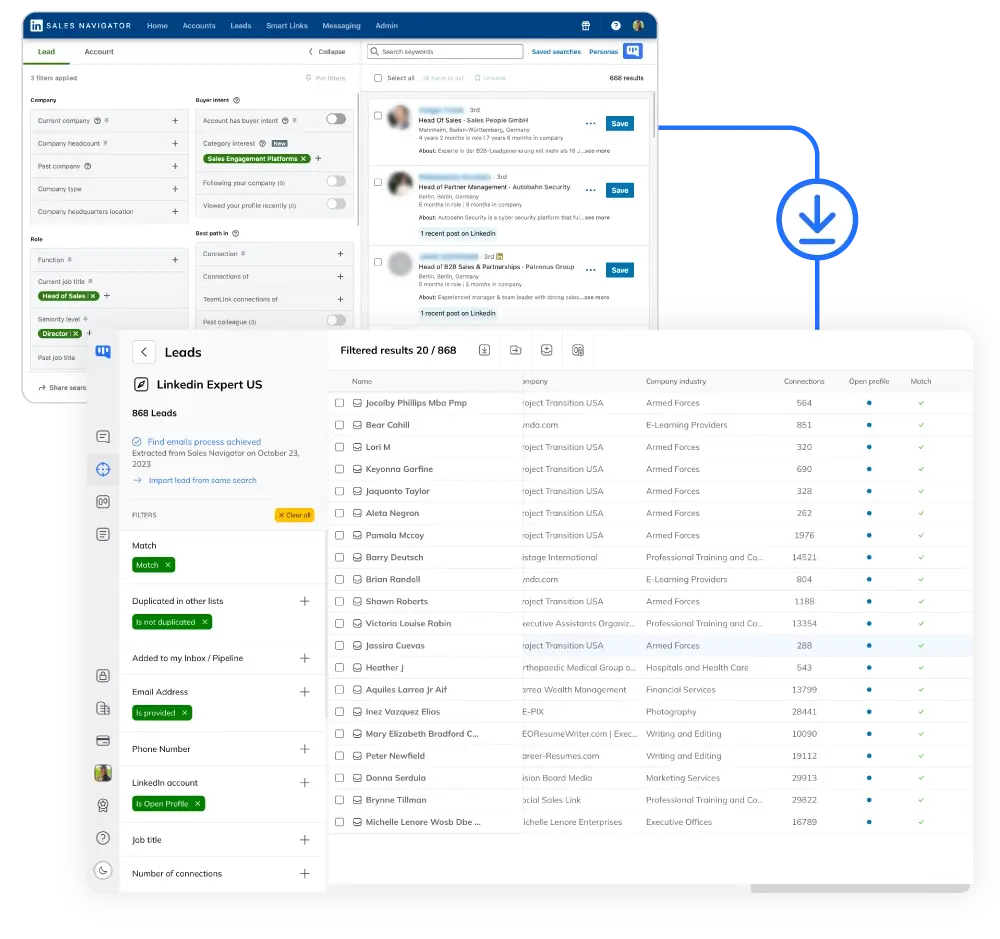
Step 1: Scrape Your LinkedIn Contacts
- Multiple sources.
- Sales Navigator, LinkedIn searches, events, or CSV imports.
- Smart filtering.
- 21+ filters to target by industry, title, company size.
- Auto-deduplication.
- Zero duplicates across all your lists.
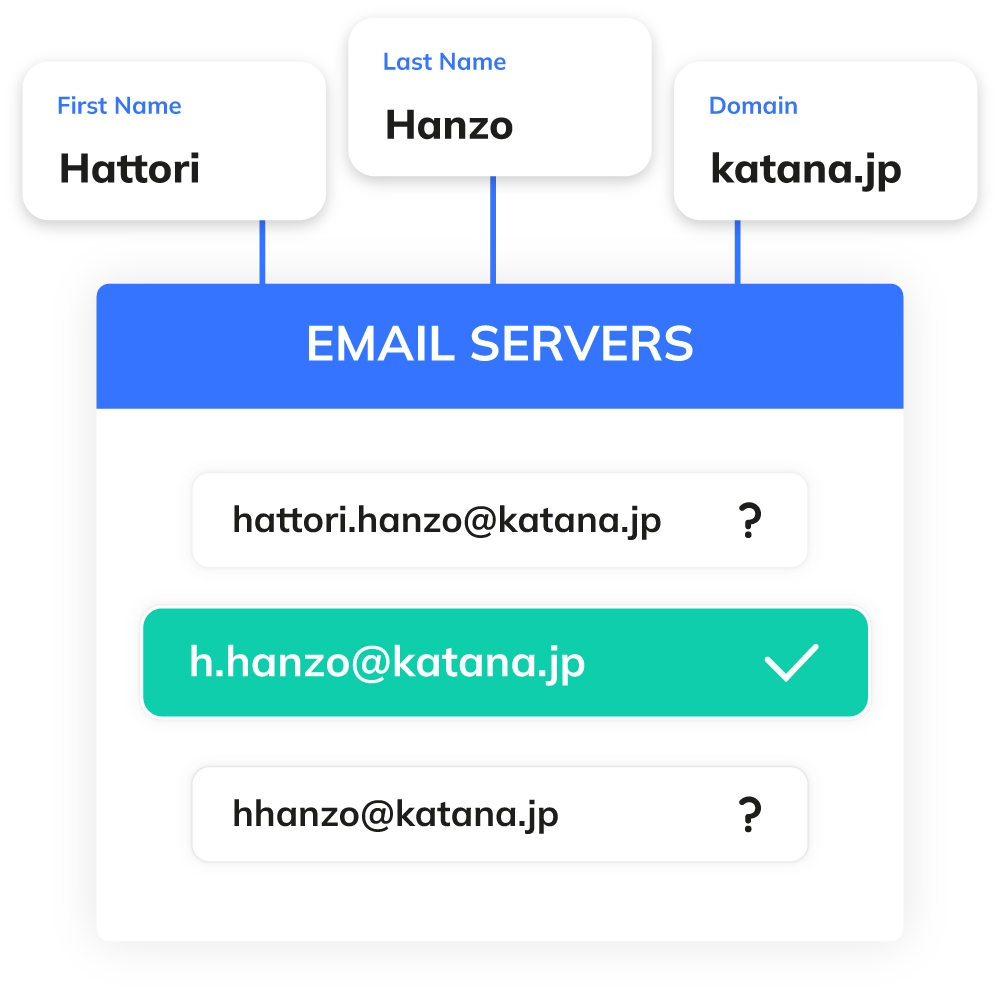
Step 2: Enrich with Emails in One Click
- Verified emails.
- 98% accuracy with real-time SMTP verification.
- Multi-data enrichment.
- Email + phone + company data in one request.
- GDPR compliant.
- On-demand generation from public data only.

Step 3: Export to CRM or Connect via API
- CRM-ready export.
- Export enriched leads with B2B emails and phones to CSV, HubSpot, Salesforce, or Pipedrive.
- API & webhooks.
- Connect via REST API and webhooks. Automate your lead enrichment pipeline with Zapier, Make, or N8N.
- Multi-channel outreach.
- Launch LinkedIn + email campaigns directly from your enriched lead lists.
Core Features
Email Finding Features That Deliver Results
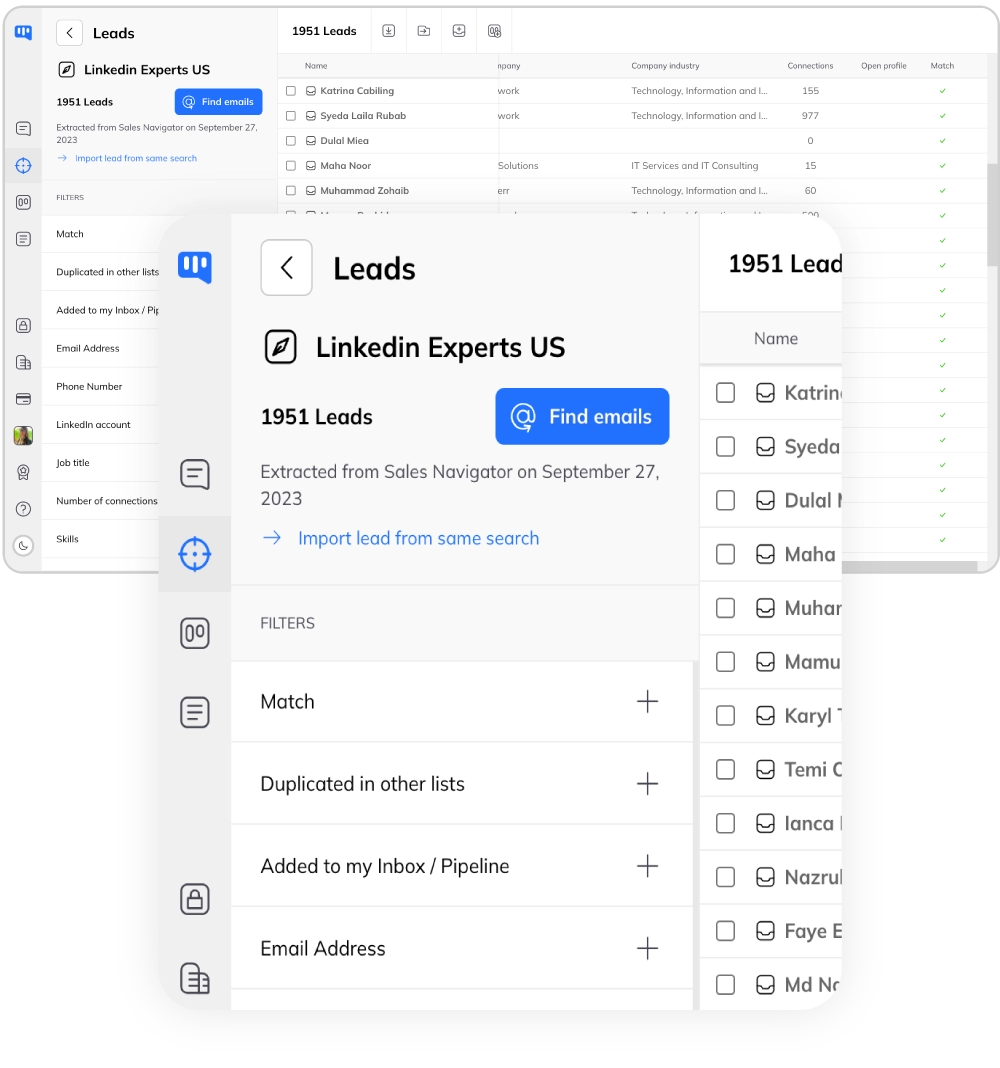
Bulk Enrichment
- Thousands at once.
- Scrape + enrich thousands of contacts in one flow.
- Auto-enrichment.
- Enable auto-enrich when scraping from Sales Navigator.
- Full data export.
- Name, title, company, email, phone in one CSV.
Real-Time Deliverability Validation
- SMTP verification.
- Each email verified against company mail servers.
- Clear status.
- Valid / Risky (catch-all) / Invalid clearly marked.
- <2% bounce rate.
- Protect your sender reputation with verified emails only.
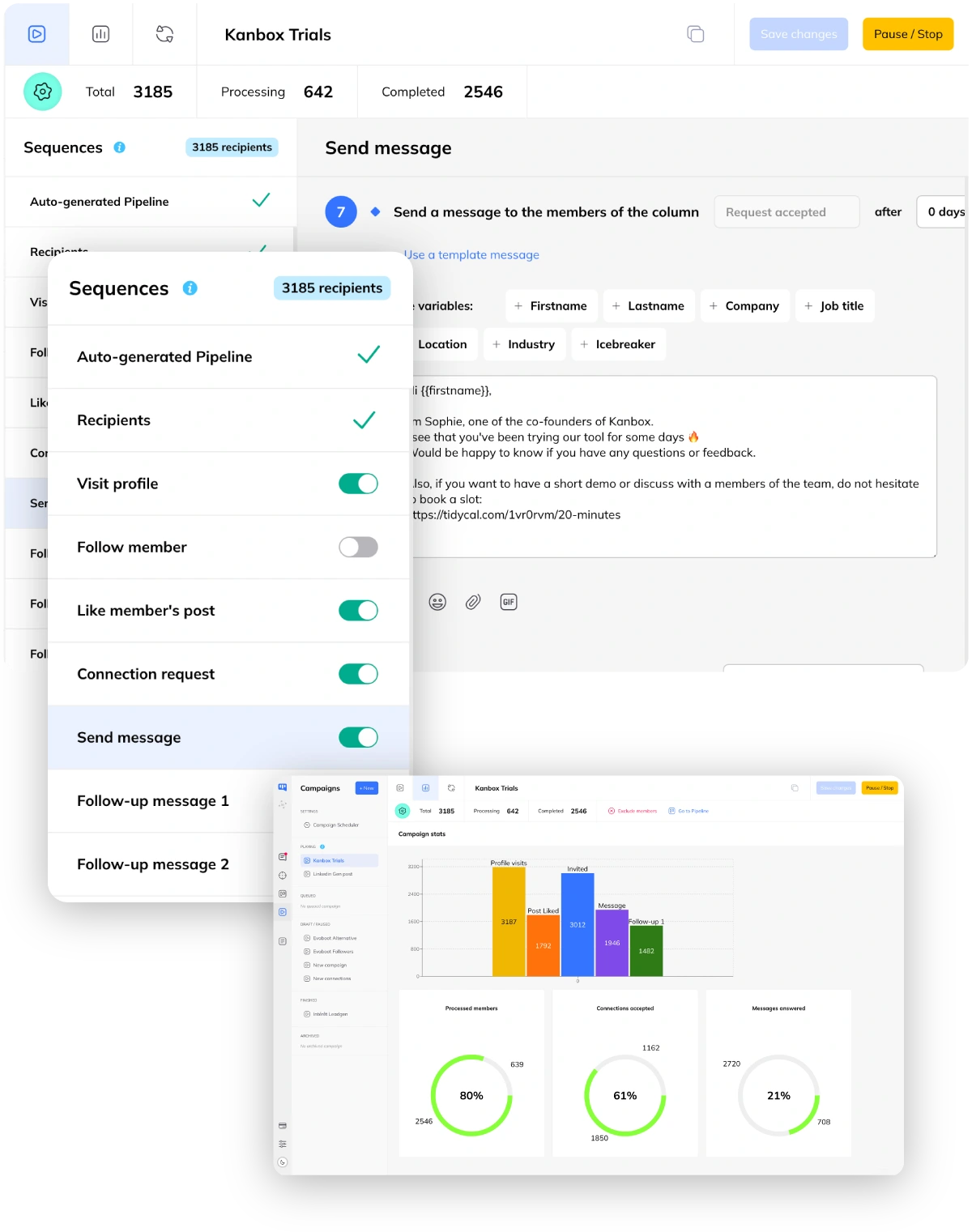
Multi-Channel Outreach
- LinkedIn + email.
- LinkedIn message first, email follow-up if no response.
- Automated sequences.
- Set up multi-step campaigns with smart delays.
- Centralized inbox.
- All conversations in one place for faster follow-up.

Phone Number Enrichment
- Direct dial numbers.
- Find direct phone numbers of decision-makers. Bypass switchboards and reach prospects instantly.
- Bulk phone enrichment.
- Enrich entire lead lists with phone numbers in one click. 100 credits per phone found.
- Combined data.
- Get B2B email + phone + company data in a single enrichment request.
CRM Export & API Integration
- Structured CSV export.
- Export enriched leads with emails, phones, and company data to CSV. Up to 10,000 contacts per batch.
- REST API & webhooks.
- Connect Kanbox to HubSpot, Salesforce, Pipedrive via API. Real-time webhooks for Pro & Agency plans.
- Zapier, Make, N8N.
- Automate your lead enrichment pipeline with no-code integrations. Push enriched data anywhere.
Ready to Find Verified Emails for Your Leads?
Bulk enrichment with B2B emails, phone numbers, and CRM export. No credit card required.
Start FreeWhy Kanbox for Email Finding?
| Feature | Standard Email Finders | Kanbox |
|---|---|---|
| Native LinkedIn integration | Limited | 100% native |
| GDPR compliance method | Database-based | On-demand |
| Email accuracy rate | 70-85% | 98% verified |
| Built-in LinkedIn scraper | ||
| CRM pipeline | Visual Kanban | |
| LinkedIn automation | Built-in sequences | |
| Pricing model | Per credit | All-in-one €15/mo |
| Phone number enrichment | Separate tool | Built-in |
| Bulk enrichment from scraping | ||
| API & webhooks | Pro & Agency | |
| B2B emails only (no Gmail) | Mixed results |
What Users Say About Kanbox Email Finder
Verified reviews from Kanbox users

UI, Kanban function. Attachments for emails make the process more efficient and structured.
Capterra
Kanbox is a game-changer. Connected to LinkedIn, we can run campaigns, track responses, and manage candidate engagement seamlessly.
Capterra
Clean interface, and the pipeline feature is unlike anything I've used before.
Capterra
Excellent pipeline management and campaigns. Everything is well-structured and streamlined.
Capterra
Kanbox's Kanban-style interface makes organizing leads incredibly easy. Custom pipelines make tracking outreach seamless.
Capterra
Seamless integration with LinkedIn and Sales Navigator. The intuitive inbox makes managing conversations easy and efficient.
Capterra
The best part? The Kanban board and filters make it easy to label and prioritize my leads effectively.
Capterra
Kanban is an excellent tool for anyone who uses LinkedIn for sales. It streamlines collecting, organizing, and interacting with potential clients.
CapterraPricing
Simple, Transparent Pricing
All plans include B2B email finding credits. Upgrade for phone enrichment, API access, and team features.
Starter
- Simultaneous Campaign: 1
- Lead Import: 300 /month
- Cloud-based
- Email Finder
- Smart Linkedin Inbox with Tags and Filters
Essential
- Simultaneous Campaign: 3
- Lead Import: 600 /month
- Cloud-based
- Email Finder
- Smart Linkedin Inbox with Tags and Filters
- Team / Multi-account
- Unlimited account managers
Pro
- Simultaneous Campaign: 5
- Lead Import: 75K /month
- Cloud-based
- Email Finder
- Smart Linkedin Inbox with Tags and Filters
- Unlimited AI Prompts and Prompt Templates
- Team / Multi-account
- Unlimited account managers
- Webhooks / API
Agency
- Simultaneous Campaign: Unlimited
- Lead Import: 75K /month
- Cloud-based
- Email Finder
- Smart Linkedin Inbox with Tags and Filters
- Unlimited AI Prompts and Prompt Templates
- Team / Multi-account
- Unlimited account managers
- Webhooks / API
- Unlimited account managers
- Bring your own Proxies
Frequently Asked Questions
1. How does LinkedIn Email Finder work?
Kanbox's LinkedIn Email Finder uses a multi-step process to find verified professional emails:
- Pattern matching: Analyses the prospect's name and company domain to predict email formats ([email protected], etc.)
- SMTP verification: Connects directly to email servers to validate addresses without sending emails
- Real-time validation: Ensures 98% accuracy with instant verification
Unlike database-based tools that rely on outdated scraped data, Kanbox generates and verifies emails on-demand—ensuring GDPR compliance and higher accuracy.
2. Is LinkedIn Email Finder GDPR compliant?
Yes, Kanbox's Email Finder is 100% GDPR compliant:
- B2B emails only: We only find professional business emails—no personal email addresses
- No centralized database: We don't store or sell email addresses in bulk databases
- Public data only: Emails are predicted from publicly available information (name + company domain)
- On-demand generation: Each email is found specifically for your request, not pre-scraped
- Server verification: We validate via SMTP without storing the data elsewhere
This approach respects privacy regulations while giving you accurate B2B contact data for legitimate outreach.
3. What is the accuracy rate of LinkedIn Email Finder?
Kanbox's LinkedIn Email Finder delivers 98% B2B email validity. Here's how we achieve this:
- Real-time SMTP verification: Every professional email is validated against the recipient's mail server
- Pattern analysis: We test multiple B2B email formats used by the company
- Bounce prevention: Invalid or catch-all addresses are flagged before delivery
- B2B only: We find professional business emails—no Gmail, Yahoo, or personal addresses
You only pay for verified B2B emails—no wasted credits on bad data.
4. How much does LinkedIn Email Finder cost?
Kanbox offers transparent pricing for email and phone enrichment:
- Starter plan: From €15/month with included email credits
- Pro and Business plans: Higher volume with bulk enrichment discounts
- Email enrichment: 1 credit per verified B2B email found
- Phone enrichment: 100 credits per direct phone number found
- Pay only for results: No charge for unverified addresses
Kanbox offers exceptional value with email finder + phone enrichment + scraping + automation + CRM all in one platform—no need for multiple subscriptions.
5. Can I find emails in bulk from LinkedIn?
Yes, Kanbox supports bulk email enrichment:
- One-click enrichment: Select multiple leads and trigger email finding for all of them
- Automatic enrichment: Enable auto-enrichment when scraping from Sales Navigator
- Export with emails: Download your enriched leads as CSV with all contact data
Process hundreds of leads at once—perfect for outbound campaigns and large prospect lists.
6. What makes Kanbox different from other email finders?
Kanbox is a complete LinkedIn prospecting solution, not just an email finder:
- Native LinkedIn integration: Works directly within LinkedIn and Sales Navigator
- Built-in lead scraping: Extract profiles before enriching them
- Visual CRM pipeline: Organize leads in Kanban boards
- LinkedIn automation: Send connection requests and messages automatically
- GDPR-first approach: On-demand email generation, no shared databases
With Kanbox, you get email finding + scraping + automation + CRM in one tool—no need for multiple subscriptions.
7. Can I use Email Finder with Sales Navigator?
Email Finder works seamlessly with LinkedIn Sales Navigator:
- Scrape + enrich: Extract leads from Sales Navigator searches and find their emails in one flow
- Saved leads: Enrich your existing Sales Navigator lead lists
- Account lists: Find emails for all decision-makers at target companies
This integration makes Kanbox the perfect companion for Sales Navigator users who want to move beyond LinkedIn messaging to email outreach.
8. Can I enrich phone numbers from LinkedIn?
Yes, Kanbox offers built-in phone number enrichment alongside email finding:
- Direct dial numbers: Find direct phone numbers of decision-makers, bypassing company switchboards
- Bulk phone enrichment: Enrich entire lead lists with phone numbers in one click
- Combined enrichment: Get B2B email + phone + company data in a single request
- Credit model: 100 credits per phone number found—pay only for results
Unlike tools that require separate subscriptions for phone data, Kanbox includes phone enrichment natively in the same platform.
9. How does Kanbox compare to Hunter.io and other email finders?
Kanbox differs from Hunter.io, Snov.io, Lusha, and other B2B email finder tools in several key ways:
- All-in-one platform: Email finding + phone enrichment + LinkedIn scraping + automation + CRM in one tool
- Native LinkedIn integration: Works directly inside LinkedIn and Sales Navigator—no copy-pasting
- GDPR on-demand: Generates emails in real-time instead of relying on pre-scraped databases
- Phone enrichment included: No separate tool needed for direct dial numbers
- Flat pricing: All-in-one from €15/month vs. per-credit pricing on most competitors
If you need email finding combined with LinkedIn scraping and outreach, Kanbox is the more complete solution.
10. Can I export enriched contacts to my CRM?
Yes, Kanbox offers multiple ways to export enriched leads to your CRM:
- CSV export: Download enriched leads with emails, phones, and company data. Up to 10,000 contacts per batch
- Direct CRM integrations: Push data to HubSpot, Salesforce, Pipedrive, and more
- API & webhooks: Connect via REST API for automated data flows (Pro & Agency plans)
- No-code automation: Use Zapier, Make, or N8N to push enriched leads anywhere
Your enriched lead data is always exportable—Kanbox never locks your contacts behind a paywall.
11. Does Kanbox work with LinkedIn scraping for bulk enrichment?
Yes, Kanbox combines LinkedIn scraping and bulk email enrichment in one seamless workflow:
- Scrape + enrich: Extract leads from LinkedIn or Sales Navigator searches and find their B2B emails automatically
- Auto-enrichment: Enable automatic email finding for every new scraped contact
- Lead lists: Enrich saved lead lists from any LinkedIn source in bulk
- Phone + email: Add both phone numbers and verified emails during the scraping process
This combined approach saves hours compared to using separate scraping and enrichment tools.
Ready to Enrich Your Leads with Verified B2B Emails?
Bulk B2B email and phone enrichment, CRM export, and API integration. Join thousands of sales teams using Kanbox.
15-day trial · No credit card required · Full access from day one