LinkedIn InMail & Messages in One Smart Inbox
InMail is powerful but limited—5 to 50 credits per month. Kanbox Smart Inbox lets you manage ALL your LinkedIn conversations (InMail replies, connection messages, and regular DMs) in a professional full-screen interface with filters, reminders, and organization tools. Never lose track of an important conversation again.
15-day free trial - No credit card required


Why professionals choose Kanbox for LinkedIn messaging
Stop losing InMail replies and important conversations in LinkedIn chaos. Manage all your messages in one professional inbox.

"Before Kanbox, I was losing InMail replies in LinkedIn's chaos. Now I manage 200+ conversations weekly with zero missed follow-ups. My response rate went from 15% to 28%."
How it works
Run your pipeline from your inbox
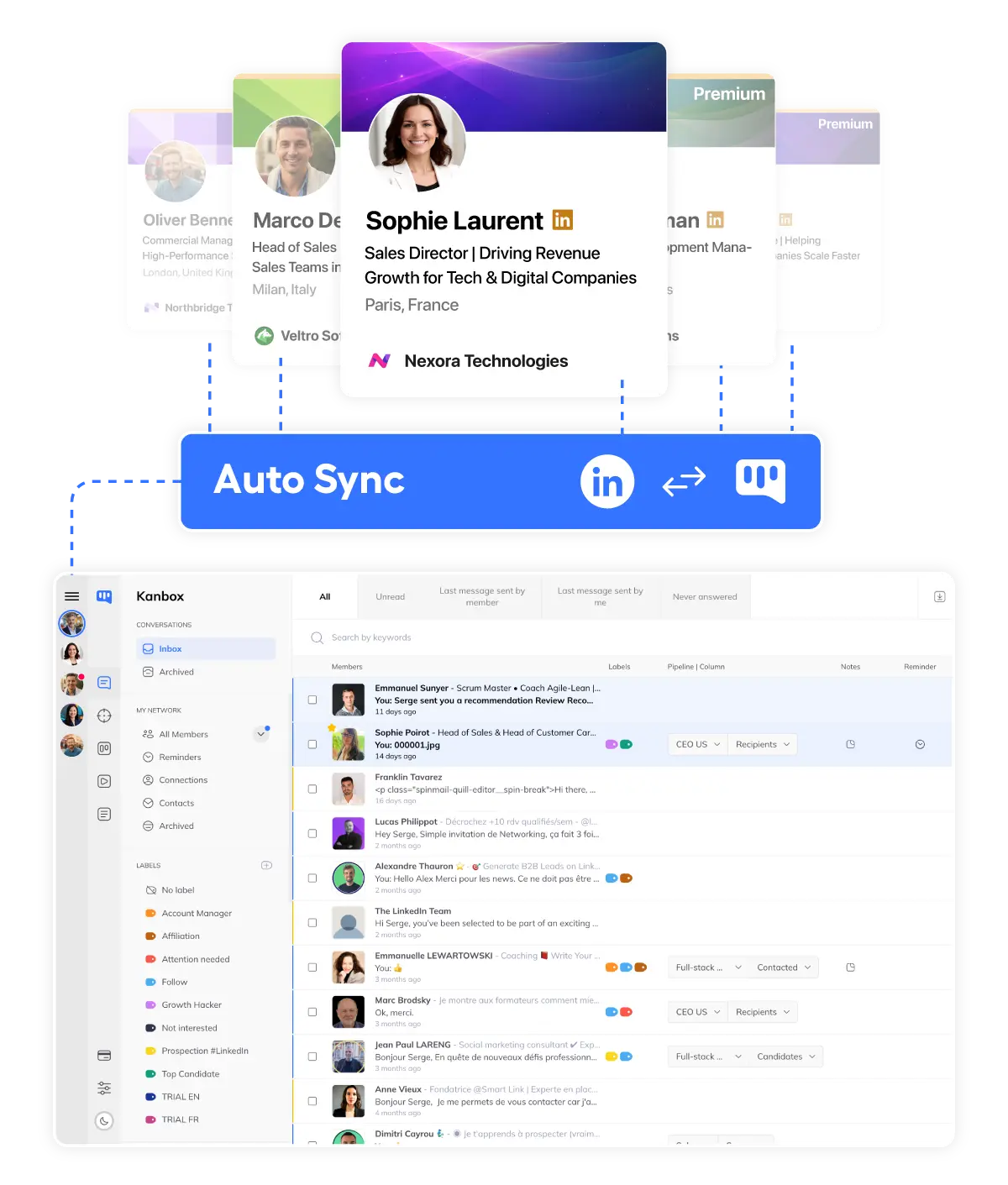
Step 1 – Plug & play sync
- Install the extension.
- Add the Kanbox Chrome extension to your browser and sign in to LinkedIn as usual.
- Auto-sync conversations.
- Kanbox detects your active LinkedIn session and pulls your LinkedIn conversations into the Smart Inbox.
- Ready to work.
- Open Kanbox and work from a clean inbox synced with LinkedIn – no setup, no manual import.
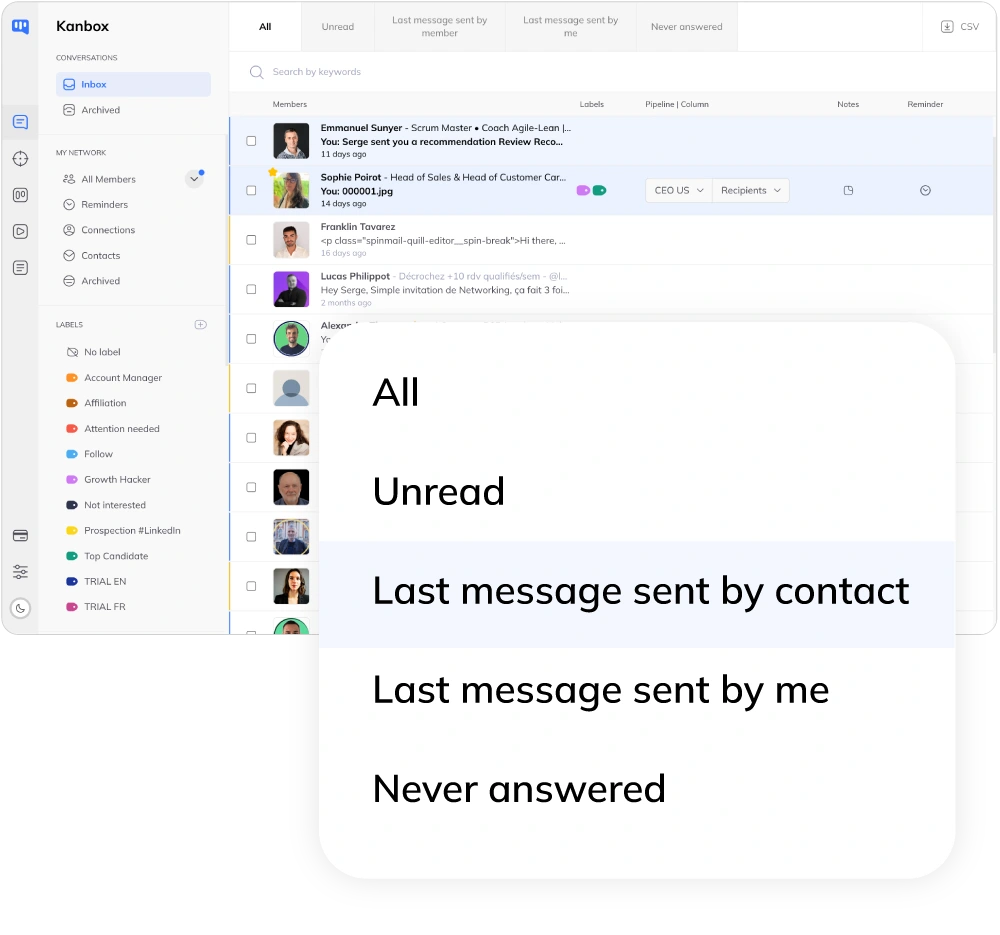
Step 2 – Work from smart filters
- Use conversation filters.
- Switch between All, Unread, Last message sent by member, Last message sent by me and Never answered to decide what to clear first.
- Open the Reminders view.
- See every conversation with a scheduled reminder in one place and run focused follow-up sessions.
- Filter by labels.
- Click any label in the sidebar to focus the inbox on a specific segment, campaign or priority group.
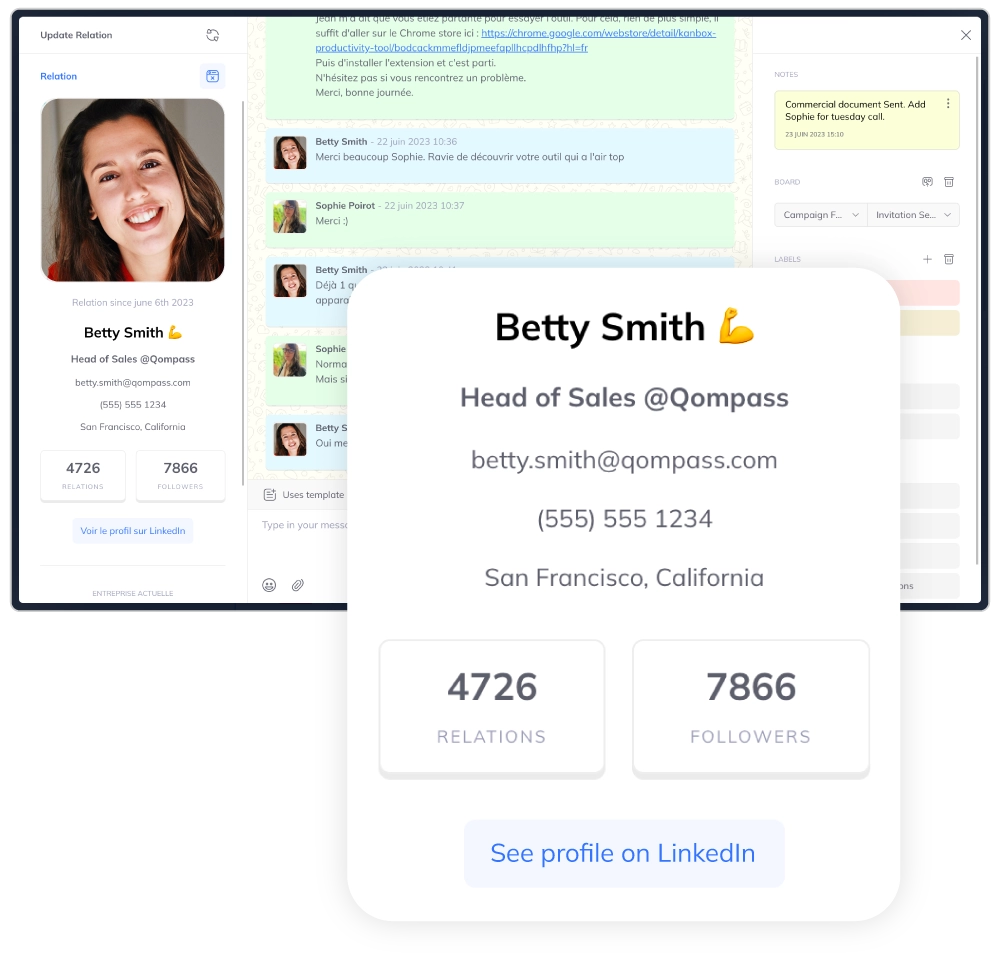
Step 3 – Never lose a conversation
- See full context.
- Keep profile, history, labels, notes and pipeline stage visible right next to each thread.
- Update labels & pipelines.
- From the side panel, add or remove labels and send the contact to the right Kanbox pipeline in one click.
- Set next step & follow-up.
- Choose the pipeline stage, set a reminder and insert templates or AI prompts so the right message goes out at the right time.
Core Features
Everything LinkedIn messaging is missing
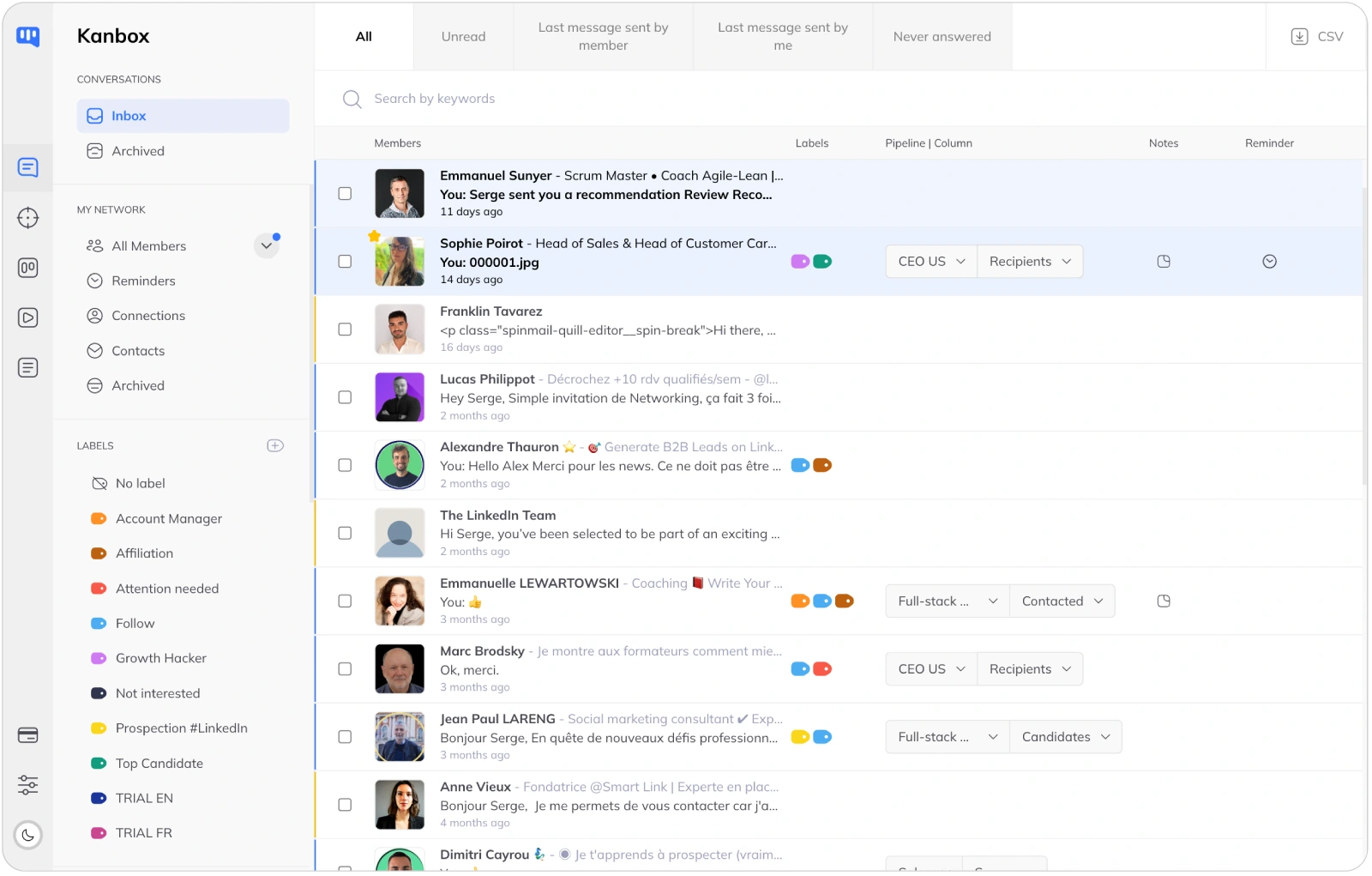
Smart LinkedIn inbox layout
- Clean member list.
- Each inbox row is tied to one member so you always know who you're talking to and where the thread stands.
- Full-screen messaging.
- Work in a full-screen conversation view with filters and search around it instead of tiny chat boxes.
- Search by message content.
- Find the right conversation by keywords in the message body instead of scrolling forever.
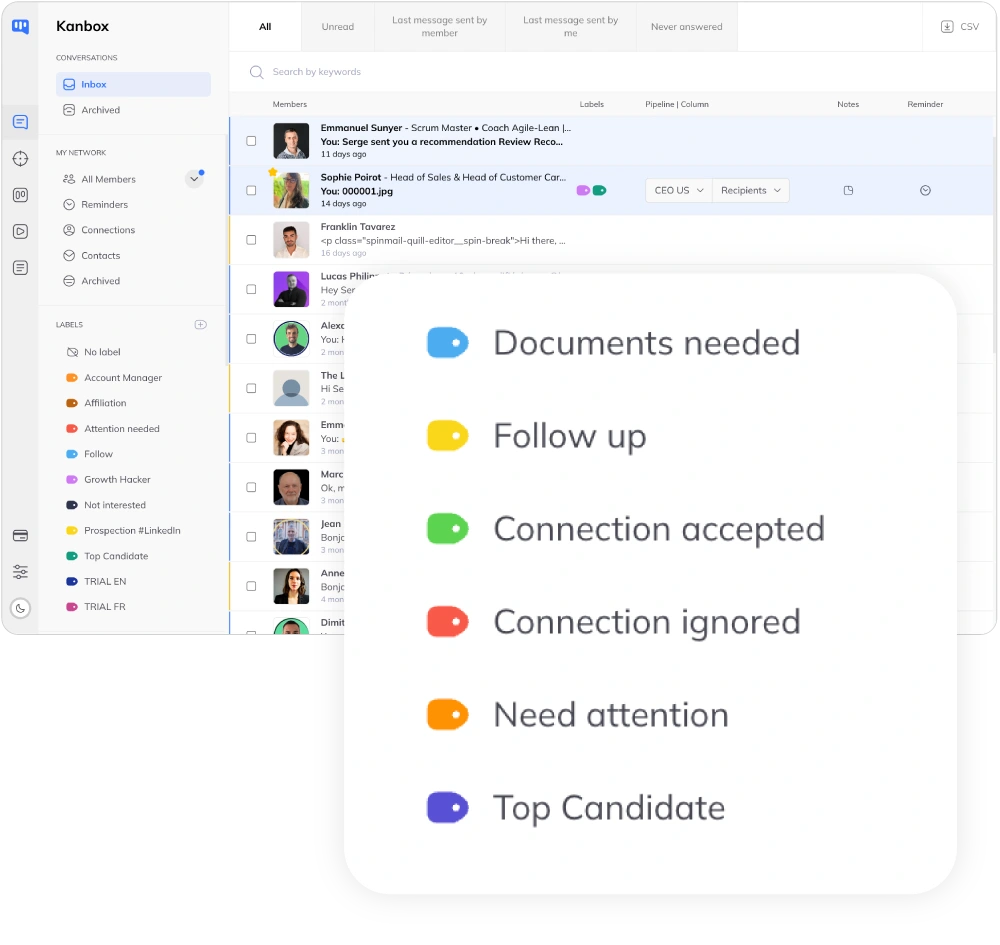
Labels, reminders & tracking together
- Labels across Inbox & CRM.
- Use labels from Inbox, chat or boards to group, track and filter your contacts in one click.
- Reminders tied to conversations.
- Schedule reminders from the member profile and clear them from the dedicated Reminders view.
- One click to pipelines.
- Open your pipelines from the sidebar and send members to the right column without leaving the inbox.

Batch actions & message templates
- Hover quick actions.
- Hover any row to add a label, send to a pipeline or schedule a reminder without opening the conversation.
- Batch updates in one go.
- Select several members and run batch actions to message, label, update pipelines or reminders at once.
- Message & AI templates.
- Insert message templates or AI prompts from Inbox, chat or pipelines, and let Kanbox handle variables and fallbacks.
Ready to Master Your LinkedIn Inbox?
Stop losing InMail replies and important conversations in LinkedIn chaos. Try Kanbox free for 15 days.
Start FreeKanbox Inbox vs Other LinkedIn Messaging Tools
| Feature | Other Tools | Kanbox |
|---|---|---|
| Inbox layout built for LinkedIn messaging | Varies by tool: often closer to a simple chat view | 3-pane inbox like modern email: sidebar, smart filters, member list and full-screen chat |
| Conversations, network and pipelines in the same screen | Usually focused on conversations only, with network and CRM handled elsewhere | Inbox sidebar groups Conversations, My Network, Labels and Pipelines so you manage replies and stages together |
| Reply-status smart filters | Basic filters (read/unread, tags) depending on the tool | Built-in views like All, Unread, Last message sent by member, Last message sent by me and Never answered |
| Hover quick actions on each conversation | Bulk actions exist, but inline shortcuts are less central | On hover, add labels, send to a pipeline or schedule reminders without opening the thread |
| Separated batch actions for LinkedIn vs internal actions | Batch actions are often grouped under one generic menu | LinkedIn actions (send message, archive, mark read…) are queued safely; Kanbox actions (labels, pipelines, reminders, email finder) run instantly |
| Messaging, templates and AI prompts in one place | Templates often live mainly in campaigns; AI varies by tool | Use saved message templates and AI prompt templates directly from the Smart Inbox, chat and pipelines |
What Sales Teams & Recruiters Say About Kanbox
Verified reviews from Kanbox users

UI, Kanban function. Attachments for emails make the process more efficient and structured.
Capterra
Kanbox is a game-changer. Connected to LinkedIn, we can run campaigns, track responses, and manage candidate engagement seamlessly.
Capterra
Clean interface, and the pipeline feature is unlike anything I've used before.
Capterra
Excellent pipeline management and campaigns. Everything is well-structured and streamlined.
Capterra
Kanbox's Kanban-style interface makes organizing leads incredibly easy. Custom pipelines make tracking outreach seamless.
Capterra
Seamless integration with LinkedIn and Sales Navigator. The intuitive inbox makes managing conversations easy and efficient.
Capterra
The best part? The Kanban board and filters make it easy to label and prioritize my leads effectively.
Capterra
Kanban is an excellent tool for anyone who uses LinkedIn for sales. It streamlines collecting, organizing, and interacting with potential clients.
CapterraPricing
Simple, Transparent Pricing
All plans include LinkedIn messaging inbox. Upgrade for more volume.
Starter
- Simultaneous Campaign: 1
- Lead Import: 300 /month
- Cloud-based
- Email Finder
- Smart Linkedin Inbox with Tags and Filters
Essential
- Simultaneous Campaign: 3
- Lead Import: 600 /month
- Cloud-based
- Email Finder
- Smart Linkedin Inbox with Tags and Filters
- Team / Multi-account
- Unlimited account managers
Pro
- Simultaneous Campaign: 5
- Lead Import: 75K /month
- Cloud-based
- Email Finder
- Smart Linkedin Inbox with Tags and Filters
- Unlimited AI Prompts and Prompt Templates
- Team / Multi-account
- Unlimited account managers
- Webhooks / API
Agency 10
- 5 Simultaneous Campaigns
- Lead Import: 75K /month
- Cloud-based
- Email Finder
- Smart Linkedin Inbox with Tags and Filters
- Unlimited AI Prompts and Prompt Templates
- Team / Multi-account
- Unlimited account managers
- Webhooks / API
- Bring your own Proxies
FAQ — LinkedIn InMail & Smart Inbox
1. What is LinkedIn InMail?
LinkedIn InMail is a Premium feature that lets you message people you're not connected with. Unlike connection requests (limited to 300 characters), InMail allows longer messages (200-character subject + 1900-character body) sent directly to someone's inbox. Available with Premium Career, Sales Navigator, and Recruiter plans.
2. How does LinkedIn InMail work?
With InMail, you can message any LinkedIn member without sending a connection request first. Each InMail uses one credit from your monthly allowance. If the recipient has an Open Profile, your InMail is free. Recipients see InMail messages in their regular LinkedIn inbox, marked as "InMail".
3. Who can use LinkedIn InMail?
InMail is available to Premium subscribers: Premium Career (5 credits/month), Premium Business (15 credits/month), Sales Navigator Core (50 credits/month), Recruiter Lite (30 credits/month), and Recruiter Corporate (150 credits/month).
4. How to send an InMail on LinkedIn?
Visit the profile of someone you're not connected with. Click "Message" or "InMail" (wording varies). Write a compelling subject line (under 200 characters) and a personalized message (under 1900 characters). Click Send. One InMail credit is deducted unless the person has an Open Profile.
5. What are the costs and limits of InMail?
InMail credits come with your LinkedIn subscription—there's no separate purchase option. Monthly allowances range from 5 (Premium Career) to 150 (Recruiter Corporate). Unused credits roll over for up to 90 days. If a recipient replies within 90 days, you get the credit back.
6. What's the difference between InMail and regular LinkedIn messages?
Regular messages are free and unlimited—but only to your 1st-degree connections. InMail lets you reach anyone on LinkedIn, but uses credits and is capped monthly. InMail messages tend to have higher open rates (they stand out in the inbox) but must be personalized to get replies.
7. What are InMail best practices?
Personalize the subject line by referencing their role, company, or recent post. Keep it short (400-600 characters get the best response rates). Lead with value—what's in it for them? Include one clear CTA. Time it right—Tuesday-Thursday mornings perform best. Follow up after 5-7 days with a connection request if no reply.
8. How effective is LinkedIn InMail?
LinkedIn reports average InMail response rates of 10-25%, compared to 1-5% for cold emails. However, highly personalized InMails can reach 35%+ response rates. The key is relevance: generic mass InMails perform poorly. Quality over quantity.
9. What are alternatives to LinkedIn InMail?
Alternatives include: connection requests (free but limited to 300 chars), Open Profile messages (free InMail to Premium users who enabled it), group messages (message members of shared groups), event attendee messages, email outreach using tools like Kanbox Email Finder, and organizing all your LinkedIn messages with Kanbox Smart Inbox.
10. How does Kanbox Smart Inbox help with InMail?
Kanbox doesn't send InMails for you—that happens on LinkedIn. But once you receive replies to your InMails, Kanbox organizes them alongside your regular messages in one unified inbox. Use filters like "Never answered" to track InMail conversations that need follow-up.
11. Can I use Kanbox without LinkedIn Premium?
Yes. Kanbox works with free LinkedIn accounts too. While you won't have InMail credits, you can still message your connections, and Kanbox helps you organize those conversations with labels, reminders, and pipelines.
12. How is Kanbox different from LinkedIn's native inbox?
LinkedIn's inbox mixes all messages in a chronological feed with ads and notifications. Kanbox gives you a full-screen, ad-free interface with smart filters (Unread, Never answered, Reminders), labels, profile context, notes, and direct pipeline integration.
13. Is Kanbox safe for my LinkedIn account?
Yes. Kanbox uses a Chrome extension that works with your existing LinkedIn session—no password sharing, no bots, no automated actions that could flag your account. You're in control of every message you send.
Ready to Organize Your LinkedIn Messaging?
Join thousands of professionals who manage their LinkedIn messages smarter with Kanbox.
15 days free · No credit card required · Full access from day one