

Kanbox vs Evaboot: From Scraping to Conversion, One Platform
Evaboot extracts data. Kanbox extracts, automates, and converts. Compare the two tools to find the right solution for your LinkedIn prospecting.
15-day free trial - No credit card required


Kanbox vs Evaboot: Head-to-Head
Complete LinkedIn prospecting platform: scraping, automation sequences, Kanban pipelines, and Smart Inbox. Extract, automate, track, and convert—all in one tool.
- LinkedIn & Sales Navigator scraping (unlimited)
- 6+ step automation sequences
- Visual Kanban pipelines
- Smart Inbox with fullscreen chat
- Email finder (30 free credits + packs)
- No Sales Navigator required
Chrome extension specialized for Sales Navigator scraping. Extracts and cleans lead data, finds emails. No automation—export only.
- Sales Navigator scraping (credit-based)
- Automatic data cleaning
- Email finder + verification
- CSV export
Feature-by-Feature Comparison
| Feature | Evaboot | Kanbox |
|---|---|---|
| Sales Navigator scraping | Credits | Unlimited |
| LinkedIn scraping | ||
| Events/Posts scraping | ||
| LinkedIn automation | 6+ steps | |
| Connection requests | ||
| Automated messages | ||
| Kanban pipelines | Unlimited | |
| Smart Inbox | Fullscreen | |
| Email finder | 2 credits/lead | 30 free + packs |
| Data cleaning | ||
| Cloud-based | ||
| French interface | ||
| Sales Navigator required | Yes ($99+/mo) | Optional |
| Starting price | $9/mo (50 leads!) | $10/mo |
| Real minimum cost | ~$108/mo | $10/mo |
Deep Dive
Detailed Feature Comparison
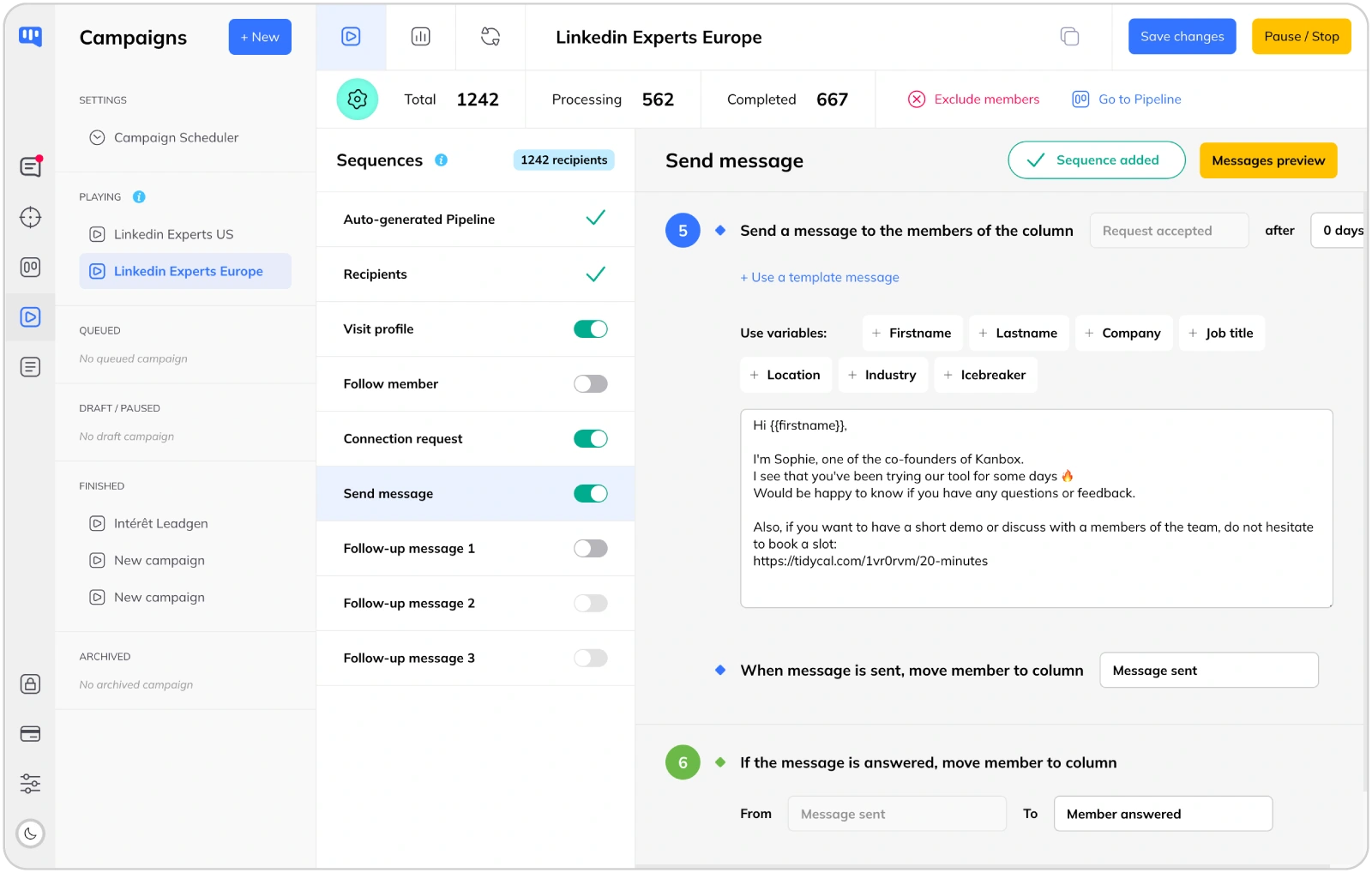
Scraper vs Complete Platform
- Evaboot = Data extraction only.
- Evaboot is a Chrome extension that scrapes Sales Navigator and exports to CSV. That's it. No automation, no pipeline, no inbox. You need other tools to actually contact your leads.
- Kanbox = Complete workflow.
- Kanbox handles everything: scrape leads from multiple sources, launch automated sequences, track in Kanban pipelines, manage conversations in Smart Inbox. One tool, zero gaps.
- Automation makes the difference.
- Evaboot can't send a single message. Kanbox automates your entire outreach: profile visits, follows, connection requests, and up to 6 follow-up messages with humanized delays.
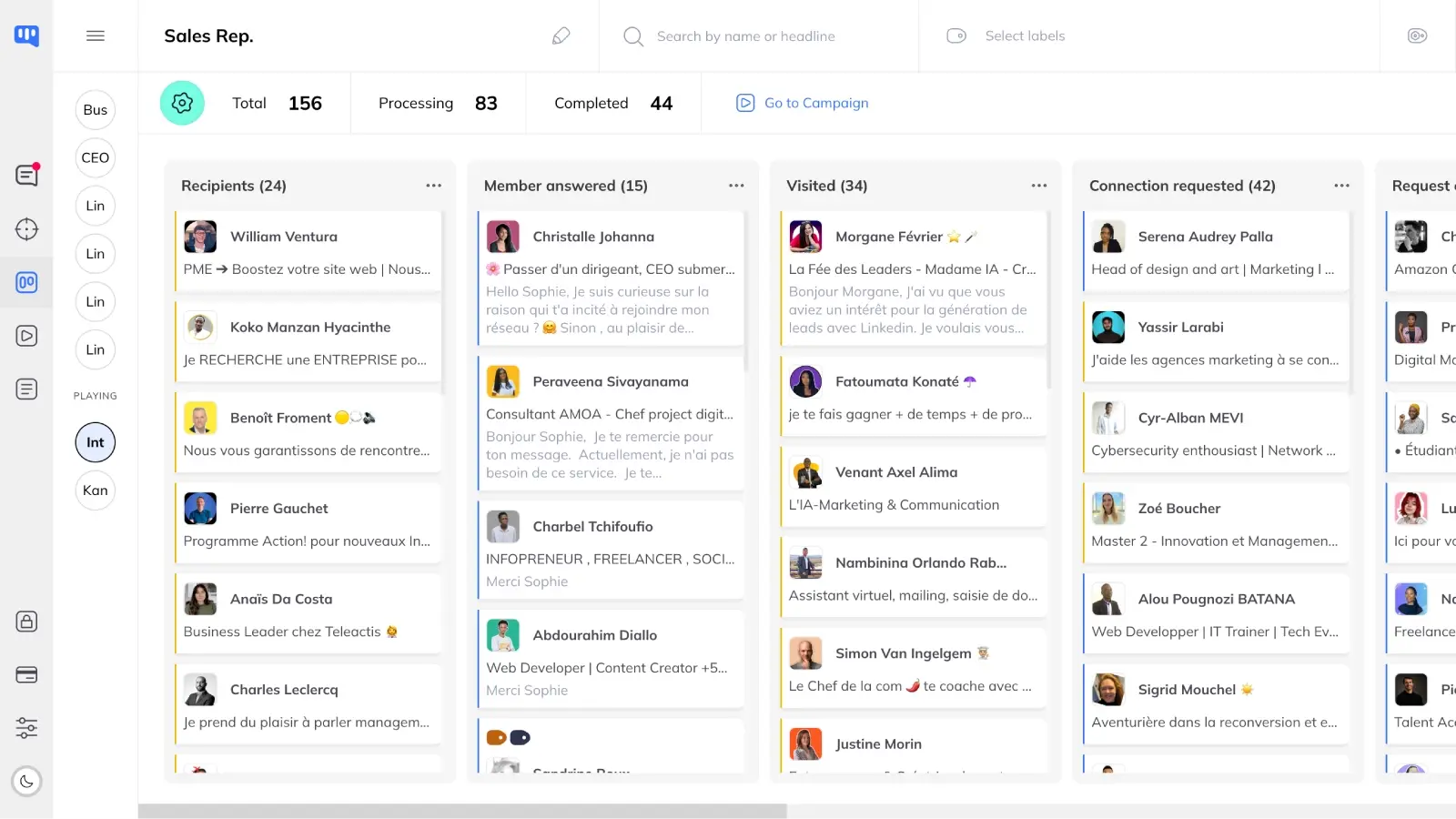
Real Cost: The Hidden Sales Navigator Tax
- Evaboot requires Sales Navigator.
- Evaboot ONLY works with Sales Navigator ($99-149/month). Their $9 Mini plan actually costs $108+/month minimum. And for that price? Only 50 leads with verified emails.
- Kanbox works with or without Sales Nav.
- Kanbox scrapes LinkedIn directly, Sales Navigator, LinkedIn Recruiter, events, posts, and URL imports. Sales Navigator is optional—not required. Start at $10/month for 300 leads/month.
- 7x cheaper in real cost.
- Kanbox Starter: $10/month for 300 leads + automation + pipelines + inbox. Evaboot Mini + Sales Nav: ~$108/month for 50 leads and ZERO automation. The math is simple.
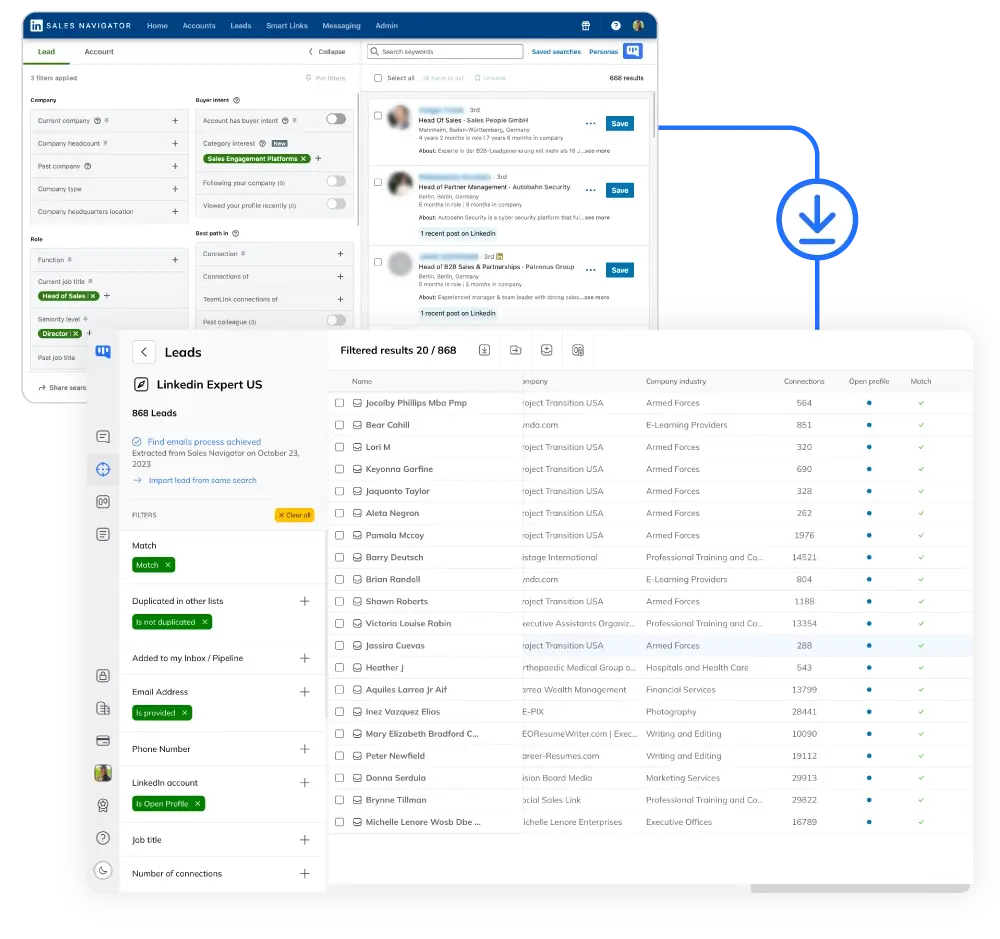
Credit System vs Unlimited Scraping
- Evaboot burns credits fast.
- Evaboot uses 2 credits per lead with email (1 for profile + 1 for email). Their $9 Mini plan gives 100 credits = only 50 complete leads. Credits lost if you cancel.
- Kanbox = unlimited scraping.
- No credit system for scraping. Extract as many profiles as you need from LinkedIn, Sales Navigator, LinkedIn Recruiter, events, or posts. Up to 75,000 leads/month on Pro plan.
- Email finder: fair pricing.
- Kanbox gives 30 free email credits to test, then pay-as-you-go packs from 15€ for 1,000 emails. 98% deliverability guaranteed. Only pay for emails you actually find.
Why Choose Kanbox Over Evaboot?
Evaboot stops at extraction. Kanbox takes you from first contact to conversion.
Frequently Asked Questions
What are the main differences between Kanbox and Evaboot?
The fundamental difference: Evaboot is a scraper, Kanbox is a complete platform.
Evaboot:
- Chrome extension for Sales Navigator only
- Extracts data and exports to CSV
- Email finder with verification
- No automation, no pipelines, no inbox
- Requires Sales Navigator ($99+/month)
Kanbox:
- Cloud-based platform
- Scraping from LinkedIn, Sales Navigator, LinkedIn Recruiter, events, posts, URL imports
- 6+ step automation sequences (visits, follows, connection requests, messages)
- Unlimited Kanban pipelines
- Smart Inbox with fullscreen chat, reminders, labels
- Email finder (30 free credits + packs)
- Sales Navigator optional—not required
Bottom line: Evaboot extracts data. Kanbox extracts, automates, and converts.
What is Evaboot exactly?
Evaboot is a Chrome extension specialized for LinkedIn Sales Navigator scraping.
It positions itself as "The #1 LinkedIn Sales Navigator Scraper" with 50,000+ users.
What Evaboot does:
- Scrapes profiles from Sales Navigator searches (15 profiles/minute)
- Automatically cleans data (removes emojis, fixes capitalization, corrects typos)
- Detects "false positives" (leads that don't match your search criteria)
- Finds and verifies professional emails
- Exports clean CSV files
What Evaboot does NOT do:
- No LinkedIn automation (no messages, no connection requests)
- No Kanban pipelines
- No inbox management
- No campaign sequences
- Cannot work without Sales Navigator
In short: Evaboot is an excellent scraper, but it’s ONLY a scraper. You’ll need other tools to actually contact and convert your leads.
How much does Evaboot cost compared to Kanbox?
Evaboot pricing (2026) — credit-based plans:
- 500 credits: $29/month ($24 yearly) — 250 leads with email
- 1,500 credits: $49/month ($41 yearly) — 750 leads with email
- 4,000 credits: $99/month ($83 yearly) — 2,000 leads with email
- 8,000 credits: $149/month ($124 yearly) — 4,000 leads with email
- 20,000 credits: $299/month ($249 yearly) — 10,000 leads with email
- 50,000 credits: $499/month ($416 yearly) — 25,000 leads with email
- 100,000 credits: $899/month ($741 yearly) — 50,000 leads with email
- 200,000 credits: $1,699/month ($1,416 yearly) — 100,000 leads with email
- Custom: Contact sales for higher volumes
IMPORTANT: Evaboot requires LinkedIn Sales Navigator ($99-149/month) to work. Real minimum cost = $128+/month.
Kanbox pricing (2026):
- Starter: $10/month (yearly) or $20/month — 1 campaign, 300 leads/month, unlimited scraping, Smart Inbox, pipelines
- Essential: $30/month (yearly) or $45/month — 3 campaigns, 600 leads/month, team features
- Pro: $50/month (yearly) or $70/month — 5 campaigns, 75K leads/month, webhooks/API
- Agency: Custom pricing — unlimited campaigns, custom proxies
Real cost comparison:
- Evaboot + Sales Navigator: ~$128/month minimum for 250 leads with email, no automation
- Kanbox Starter: $10/month for 300 leads + automation + pipelines + inbox
Kanbox is 12x cheaper in real cost and includes features Evaboot doesn’t have at any price (automation, pipelines, inbox).
Does Evaboot have a free plan?
No, Evaboot does not have a free plan.
Evaboot offers 8 credit-based plans starting at $29/month (or $24/month billed yearly) for 500 credits.
Even with the cheapest plan, remember:
- You still need LinkedIn Sales Navigator ($99-149/month)
- Real cost: $128+/month minimum
- 2 credits = 1 lead with verified email (so 500 credits = 250 complete leads)
Kanbox alternative:
- 15-day free trial with full features (no credit card required)
- Starter plan at $10/month (yearly) includes scraping + automation + pipelines + inbox
- No Sales Navigator required
How does the Evaboot credit system work?
Evaboot uses a credit-based system:
Credit consumption:
- 1 credit = 1 lead or account exported
- 1 credit = 1 email found + verified
- 0.5 credit = 1 email verified only
- 2 credits = 1 complete lead with verified email
Available plans (monthly / yearly):
- 500 credits: $29 / $24 — 250 leads with email
- 1,500 credits: $49 / $41 — 750 leads with email
- 4,000 credits: $99 / $83 — 2,000 leads with email
- 8,000 credits: $149 / $124 — 4,000 leads with email
- 20,000 credits: $299 / $249 — 10,000 leads with email
- 50,000+ credits: $499 to $1,699 — up to 100,000 leads with email
Important notes:
- Unused credits roll over as long as you have an active subscription
- Credits are lost if you cancel your subscription
- Unlimited seats and Sales Navigator accounts included
Kanbox approach: No credit system for scraping. Extract unlimited leads. Email finder uses simple pay-as-you-go packs (30 free credits + packs from $15/1,000 emails).
Can I send automated messages with Evaboot?
No, Evaboot cannot send any messages or automate any LinkedIn actions.
Evaboot is exclusively a data extraction tool. It can:
- Extract profiles from Sales Navigator
- Clean and format data
- Find and verify emails
- Export to CSV
To actually contact your leads, you need another tool.
Kanbox automation includes:
- Profile visits
- Follow member
- Like member’s post
- Connection requests (with personalized notes)
- Direct messages
- Up to 6 follow-up messages
- Humanized delays between actions
- Automatic pipeline progression
With Kanbox, you go from lead extraction to conversion in one tool.
Does Kanbox require LinkedIn Sales Navigator?
No, Kanbox does NOT require Sales Navigator.
This is a key difference from Evaboot:
Kanbox scraping sources (all included):
- LinkedIn standard search
- Sales Navigator (optional—if you have it)
- LinkedIn event attendees
- LinkedIn post contributors (likes, comments)
- List of profile URLs
Evaboot limitation:
- ONLY works with Sales Navigator
- Sales Navigator costs $99-149/month (separate subscription)
- Real minimum cost: Evaboot + Sales Nav = $108+/month
Bottom line: With Kanbox, you can start prospecting immediately with just a LinkedIn account. Sales Navigator is a plus, not a requirement.
Which tool is best for LinkedIn automation?
Kanbox—because Evaboot has zero automation.
This isn’t a close comparison. Evaboot is a scraper, not an automation tool.
Evaboot automation capabilities:
- None. Zero. It only extracts data.
Kanbox automation capabilities:
- Multi-step campaigns (up to 6+ steps)
- Profile visits, follows, post likes
- Personalized connection requests
- Automated message sequences
- Humanized delays to protect your account
- Automatic lead progression in pipelines
- A/B testing for messages
If you need LinkedIn automation, Kanbox is your only choice between these two tools.
How do I export leads from Sales Navigator?
Both tools can export leads from Sales Navigator, but with different approaches:
With Evaboot:
- Install Chrome extension
- Open Sales Navigator search
- Click Evaboot button to start scraping
- Wait (15 profiles/minute)
- Download CSV file
- Import into another tool for outreach
With Kanbox:
- Paste Sales Navigator search URL
- Kanbox extracts profiles automatically
- Clean data with 22 advanced filters
- Launch automation directly (no export needed)
- Track in Kanban pipelines
- Manage responses in Smart Inbox
Key difference: Evaboot stops at the CSV export. Kanbox continues through the entire prospecting workflow.
Can Kanbox scrape LinkedIn events and posts?
Yes, Kanbox can scrape from multiple LinkedIn sources that Evaboot cannot access:
Kanbox scraping sources:
- LinkedIn standard search
- Sales Navigator search (if you have it)
- LinkedIn event attendees — great for targeting people interested in specific topics
- LinkedIn post contributors — people who liked or commented on posts
- List of profile URLs — import from any source
Evaboot scraping sources:
- Sales Navigator search only
- No LinkedIn standard search
- No events
- No posts
Why this matters: Event attendees and post contributors are highly engaged leads. They’ve already shown interest in topics relevant to your business. Evaboot can’t access them.
Which tool is safer for my LinkedIn account?
Kanbox is designed with LinkedIn safety as a priority.
Kanbox safety features:
- Cloud-based — no suspicious browser extension behavior
- Humanized delays between actions
- Daily action limits that respect LinkedIn guidelines
- Smart scheduling to mimic human patterns
- Account warm-up recommendations
Evaboot safety:
- Chrome extension (more detectable)
- Scraping only — less risky since no outreach actions
- 15 profiles/minute rate limit
Risk comparison: Evaboot’s pure scraping carries less risk than automation, but you’ll need another tool for outreach anyway. Kanbox’s cloud-based approach with built-in safety limits provides a safer automation experience than browser extensions.
Which tool should I choose for my sales team?
For sales teams, Kanbox is the clear winner.
Why Evaboot falls short for teams:
- Extraction only — your team still needs outreach tools
- No shared pipelines
- No conversation management
- Each user needs Sales Navigator ($99+/month each)
- Total cost: Evaboot + Sales Nav × team size = expensive
Kanbox team features:
- Shared Kanban pipelines — see all deals in one view
- Team lead list pooling
- Multi-account management
- Team manager dashboard
- Email credits shared across team
- No Sales Navigator required
Cost comparison (team of 3):
- Evaboot Growth + Sales Nav: ($79 + $99) × 3 = $534/month for scraping only
- Kanbox Essential: $30 × 3 = $90/month for complete platform
Kanbox saves 83% while providing 10x more functionality.
What are the best Evaboot alternatives?
Kanbox is the best Evaboot alternative if you want more than just scraping.
Why switch from Evaboot to Kanbox:
- All-in-one: Scraping + automation + pipelines + inbox in one tool
- No Sales Navigator tax: Works with LinkedIn directly
- Unlimited scraping: No credit system for profile extraction
- Automation included: Send messages without another tool
- Visual pipelines: Track every lead’s progress
- 7x cheaper: $10/month vs ~$108/month real cost
When Evaboot might still be right:
- You only need data extraction
- You already have automation tools you’re happy with
- You specifically need Evaboot’s false positive detection
- You’re already paying for Sales Navigator anyway
For most users: Kanbox provides better value with a complete solution instead of a single-purpose tool.
Verified reviews from Kanbox users

UI, Kanban function. Attachments for emails make the process more efficient and structured.
Capterra
Kanbox is a game-changer. Connected to LinkedIn, we can run campaigns, track responses, and manage candidate engagement seamlessly.
Capterra
Clean interface, and the pipeline feature is unlike anything I've used before.
Capterra
Excellent pipeline management and campaigns. Everything is well-structured and streamlined.
Capterra
Kanbox's Kanban-style interface makes organizing leads incredibly easy. Custom pipelines make tracking outreach seamless.
Capterra
Seamless integration with LinkedIn and Sales Navigator. The intuitive inbox makes managing conversations easy and efficient.
Capterra
The best part? The Kanban board and filters make it easy to label and prioritize my leads effectively.
Capterra
Kanban is an excellent tool for anyone who uses LinkedIn for sales. It streamlines collecting, organizing, and interacting with potential clients.
CapterraReady to go beyond scraping?
15-day free trial • No credit card required
15 days free · No credit card required · Full access from day one