

Kanbox vs La Growth Machine: Which LinkedIn tool is best for you?
Discover which prospecting tool is right for you. Compare features, pricing, and user experience to make the best choice for your LinkedIn strategy.
15-day free trial - No credit card required


Meet the Contenders
LinkedIn-focused prospecting platform with unlimited scraping, visual Kanban pipelines, and smart inbox management. Perfect for teams who want simplicity and efficiency.
- Unlimited LinkedIn & Sales Navigator scraping
- 6+ step automation sequences
- Visual Kanban pipelines
- Smart Inbox with fullscreen chat
- Email finder included
- Tags and advanced segmentation
Multichannel outreach platform combining LinkedIn, email, and Twitter. Designed for teams needing to engage prospects across multiple channels.
- Multichannel outreach (LinkedIn + Email + Twitter)
- AI voice messages
- CRM integrations (HubSpot, Pipedrive)
- Waterfall email enrichment
Feature-by-Feature Comparison
| Feature | La Growth Machine | Kanbox |
|---|---|---|
| LinkedIn automation | ||
| Multi-step sequences | 4 steps | 6+ steps |
| Kanban pipelines | ||
| Smart Inbox | ||
| Unlimited LinkedIn scraping | ||
| Email finder | ||
| Multichannel (email + Twitter) | ||
| AI voice messages | ||
| CRM integrations | Zapier | |
| Starting price | €60/mo | $10/mo |
Deep Dive
Detailed Feature Comparison
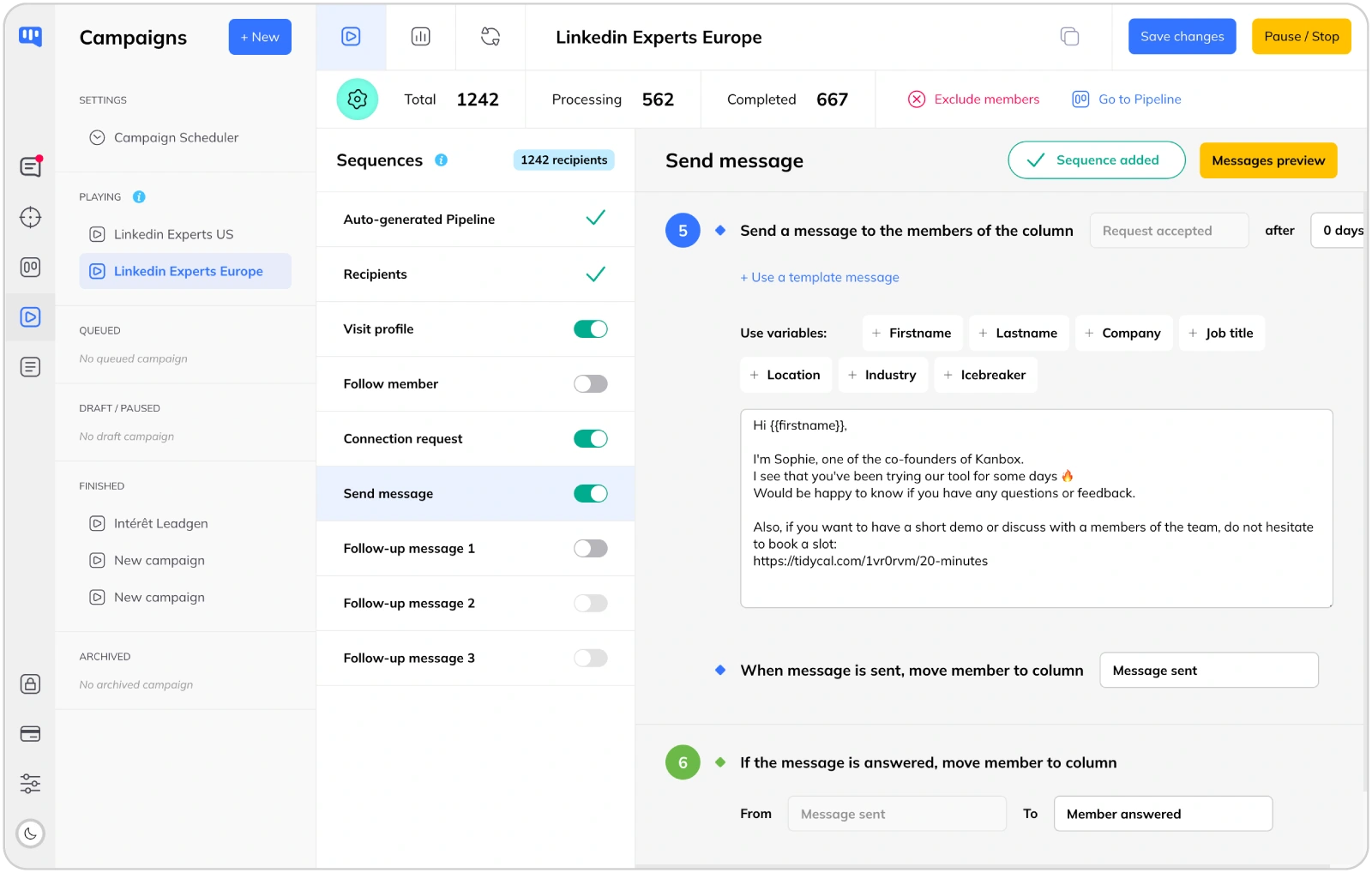
LinkedIn Automation: Personalized Sequences
- Multi-step sequences.
- Kanbox offers 6+ step sequences (profile visits, follows, likes, connection requests, messages, follow-ups) vs 4 steps for LGM. More touchpoints mean higher conversion rates.
- Human-like delays.
- Random intervals between actions mimic human behavior. This humanized approach reduces the risk of LinkedIn restrictions and increases response rates.
- Smart scheduling.
- Schedule campaigns during business hours. Set custom time windows for each sequence step to maximize engagement.
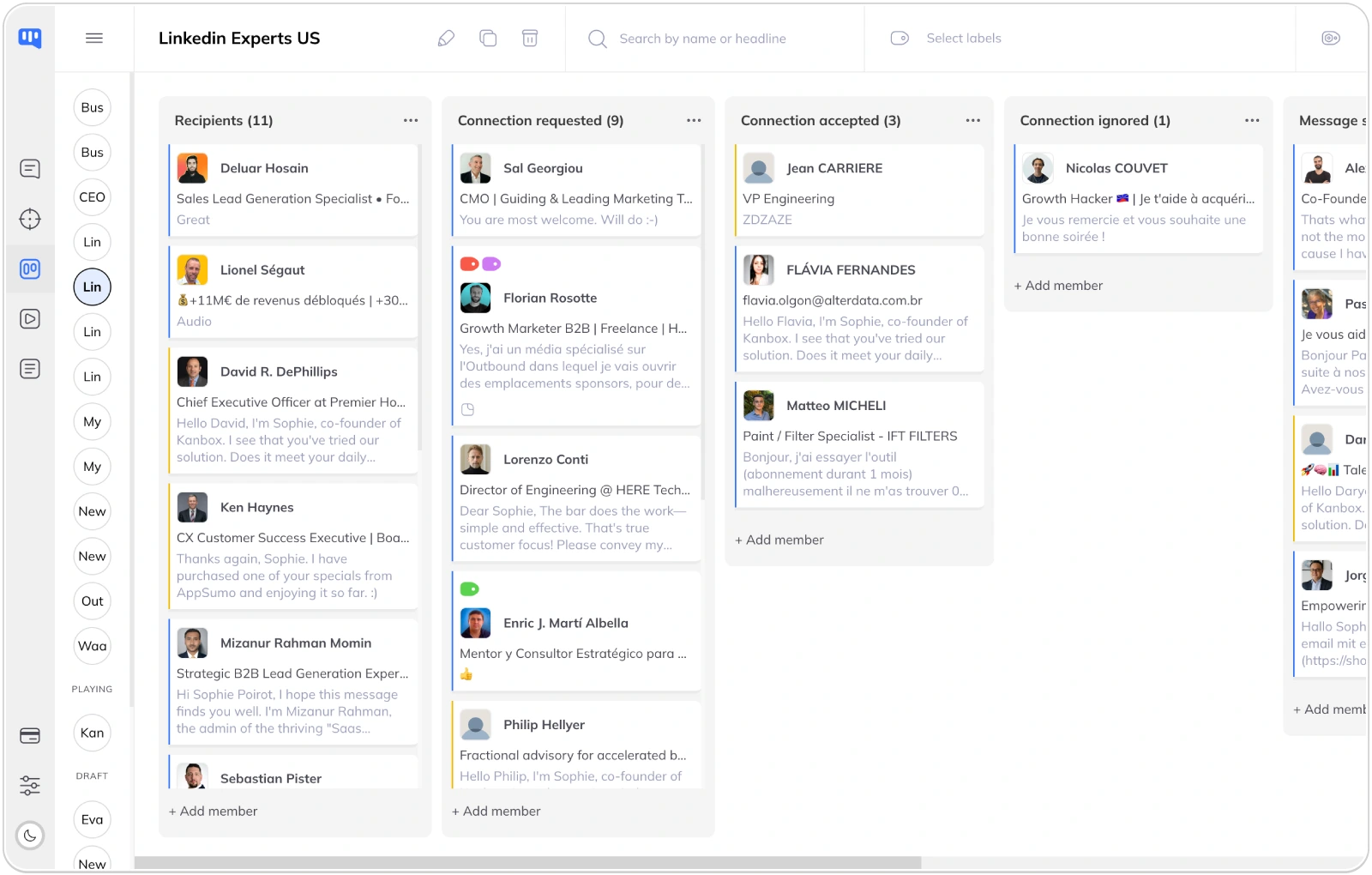
Lead Management: Visual Kanban Pipelines
- Visual pipeline management.
- Kanbox offers unlimited Kanban pipelines to track leads through your sales funnel. La Growth Machine lacks this visual approach—you manage leads in spreadsheet-style lists.
- Tags and segmentation.
- Organize leads with custom tags, notes, and filters. Segment your prospects by industry, company size, engagement level, or any custom criteria.
- Team collaboration.
- Share pipelines across your team. Assign leads to team members, track progress, and ensure no prospect falls through the cracks.
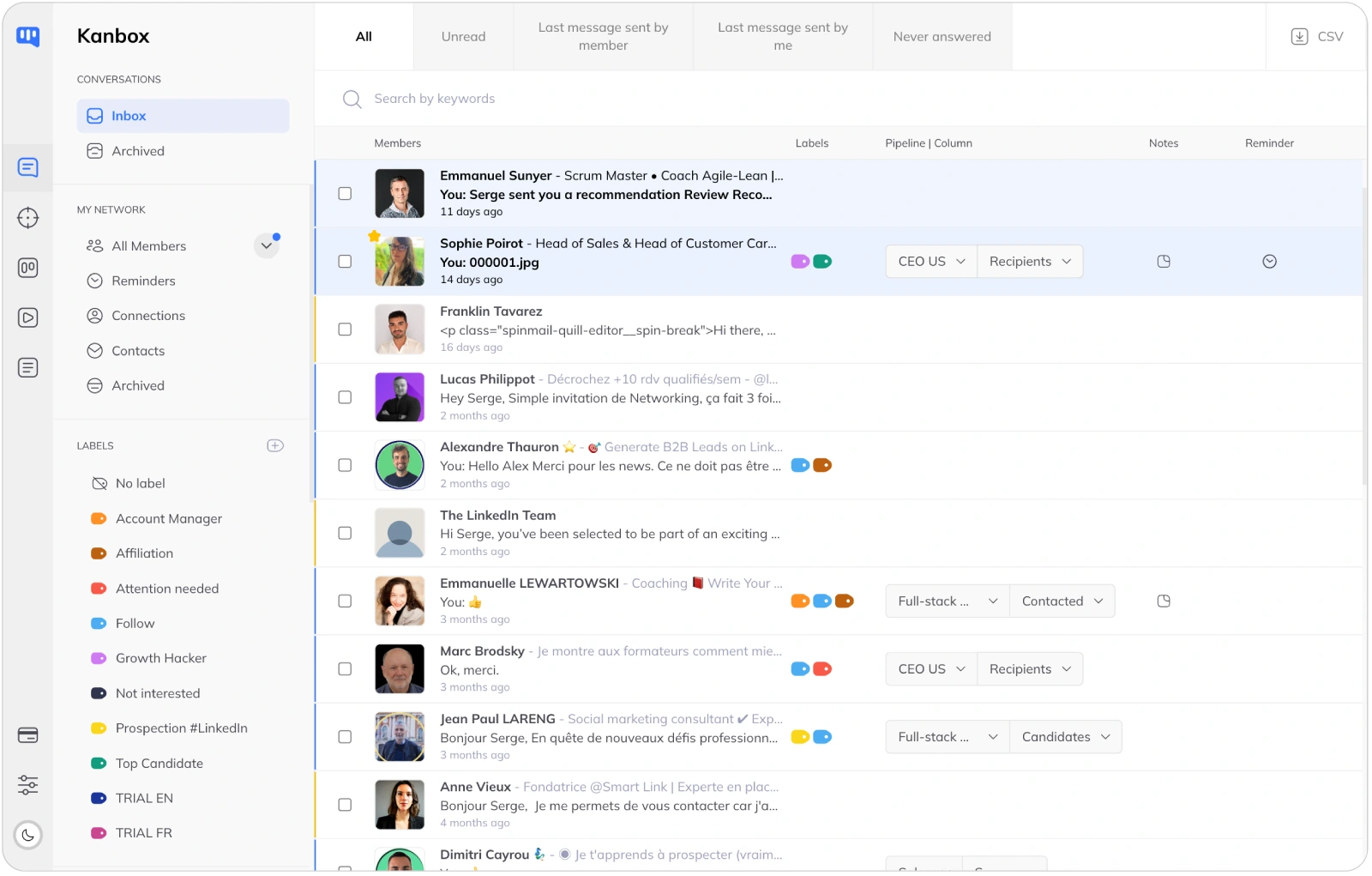
Smart Inbox: Never Miss a Conversation
- Unified inbox.
- All your LinkedIn conversations in one place. Fullscreen chat mode, quick replies, and message templates. La Growth Machine offers basic inbox management but lacks the advanced features.
- Advanced filters.
- Filter by tags, campaign, connection status, or message content. Find any conversation instantly, even across thousands of contacts.
- Reminders and follow-ups.
- Set reminders on any conversation. Never forget to follow up with a hot prospect. Kanbox keeps you organized and on top of your outreach.
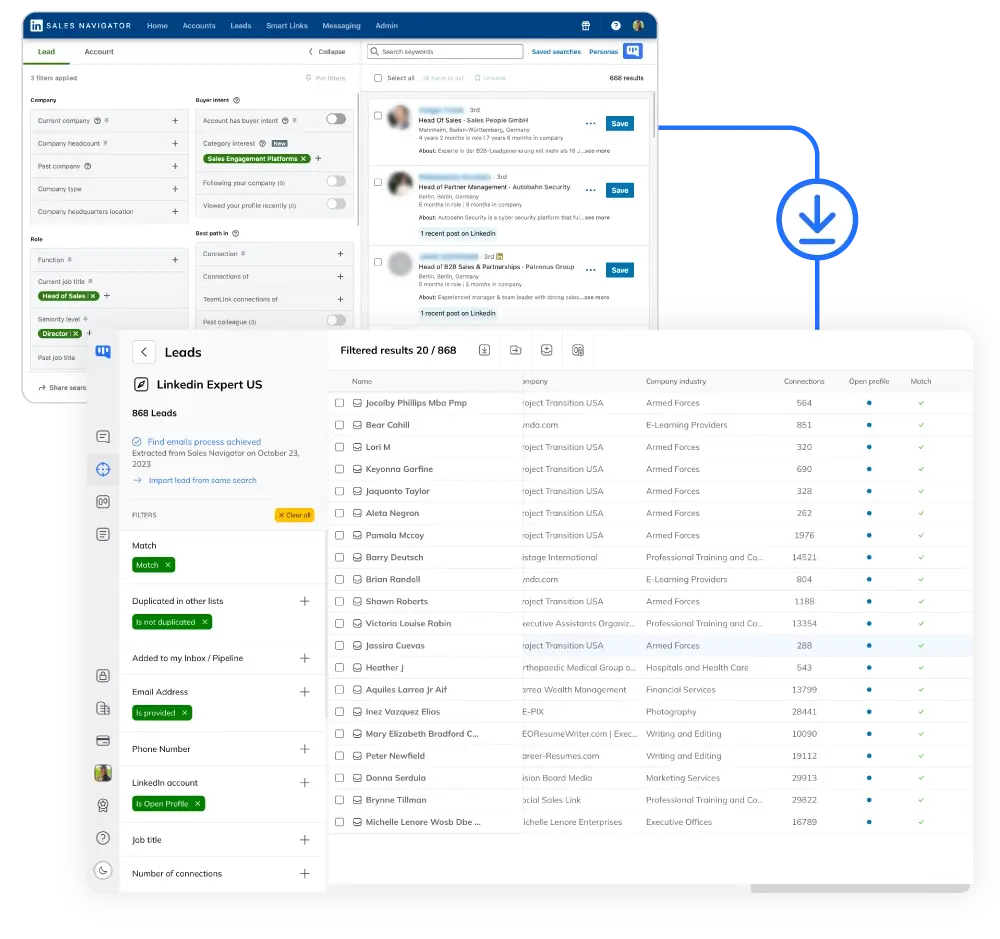
LinkedIn Scraping: Unlimited Data Extraction
- Unlimited scraping included.
- Extract up to 75,000 LinkedIn profiles per month from any source: Sales Navigator, events, posts, or URL imports. La Growth Machine charges $5 per lead for enrichment—costs add up fast.
- Auto-deduplication.
- Zero duplicates across all your lists. Kanbox detects and merges profiles automatically, saving hours of manual cleanup.
- Email finder included.
- Find professional emails for your scraped profiles. 98% deliverability rate with SMTP verification. No extra cost—included in all plans.
Why Choose Kanbox for Your LinkedIn Prospecting?
If LinkedIn is your main prospecting channel, Kanbox offers everything you need at a better price.

"We evaluated both tools and chose Kanbox for its simplicity and value. The visual pipelines alone save us hours every week. We’re getting better results at half the price."
Frequently Asked Questions
What are the main differences between Kanbox and La Growth Machine?
The main difference lies in their focus and approach to prospecting.
Kanbox specializes in LinkedIn prospecting with features designed specifically for the platform:
- Unlimited LinkedIn and Sales Navigator scraping included in all plans
- Visual Kanban pipelines for lead management (unique to Kanbox)
- Smart Inbox with fullscreen chat, tags, filters, and reminders
- 6+ step automation sequences with humanized delays
- Email finder with 98% deliverability included
La Growth Machine offers multichannel outreach (LinkedIn + Email + Twitter) with:
- Cross-channel sequences combining multiple platforms
- AI voice messages for LinkedIn
- Native CRM integrations (HubSpot, Pipedrive)
- Waterfall email enrichment (charged extra at $5/lead)
Key trade-offs: If LinkedIn is your primary channel, Kanbox offers better value with more LinkedIn-specific features at 75% lower cost. If you need true multichannel outreach across LinkedIn, email, and Twitter, La Growth Machine may be worth the premium.
Which tool is best for LinkedIn-only prospecting?
If LinkedIn is your primary prospecting channel, Kanbox is the clear winner. Here's why:
1. Purpose-built for LinkedIn
Kanbox was designed from the ground up for LinkedIn prospecting. Every feature—from scraping to inbox management—is optimized for the platform. La Growth Machine spreads its development across multiple channels.
2. Superior lead management
Kanbox's visual Kanban pipelines let you track every lead through your sales funnel. You see exactly where each prospect stands. La Growth Machine uses traditional list views—less visual, harder to manage at scale.
3. Unlimited scraping included
Extract up to 75,000 profiles/month from Sales Navigator, events, posts, and URL imports. La Growth Machine doesn't include scraping—you need third-party tools or pay for enrichment.
4. Better price-to-value ratio
Kanbox starts at $10/month with all LinkedIn features included. La Growth Machine starts at €60/month, and you'll pay extra for enrichment ($5/lead). For a team of 3 doing LinkedIn-only prospecting, Kanbox saves over $1,500/year.
Bottom line: Don't pay for multichannel features you won't use. Choose the tool built specifically for your channel.
What are the pricing differences between Kanbox and LGM?
Kanbox pricing (all features included):
- Starter: $10/month (yearly) or $20/month (monthly) — 1 campaign, 300 leads/month, unlimited scraping
- Essential: $30/month (yearly) or $45/month (monthly) — 3 campaigns, 600 leads/month, team features
- Pro: $50/month (yearly) or $70/month (monthly) — 5 campaigns, 75K leads/month, webhooks/API
- Agency: Custom pricing — unlimited campaigns, custom proxies
La Growth Machine pricing:
- Basic: €60/month per identity — 3 campaigns max, 250 leads/month enrichment
- Pro: €120/month per identity — 6 campaigns, 400 leads/month enrichment
- Ultimate: €180/month per identity — unlimited campaigns, 1000 leads/month enrichment
- Extra enrichment: $5 per lead for verified email
Real cost comparison (team of 3, 1000 leads/month):
- Kanbox Pro: $50/month × 3 = $150/month (scraping + email finder included)
- LGM Basic: €60/month × 3 + (750 × $5) = €180 + $3,750 = ~$4,000/month
With Kanbox, you save over 95% when factoring in enrichment costs.
Does Kanbox offer CRM integrations like La Growth Machine?
Yes, but with a different approach.
Kanbox integrations:
- Zapier: Connect to 5,000+ apps including HubSpot, Salesforce, Pipedrive, Slack, Google Sheets, Airtable, and more
- Webhooks: Incoming and outgoing webhooks for custom integrations (Pro and Agency plans)
- CSV export: Clean, structured exports ready for any CRM import
La Growth Machine integrations:
- Native HubSpot and Pipedrive integrations (Pro plan and above)
- Zapier/Make support
- API access on higher plans
Which is better? It depends on your needs:
- If you specifically need HubSpot/Pipedrive native sync with real-time bidirectional updates, LGM's native integrations are stronger
- If you use any other CRM or need flexibility, Kanbox's Zapier integration covers more tools with easier setup
- For most small-to-medium teams, Zapier provides all the integration power needed without the complexity
What do users say about each tool?
Based on reviews from G2, Capterra, and user feedback (2024-2025):
Kanbox strengths (common praise):
- "Simple and intuitive interface—I was up and running in 10 minutes"
- "The Kanban pipelines are a game-changer for lead tracking"
- "Best value for LinkedIn prospecting, period"
- "Unlimited scraping saves us thousands in enrichment costs"
- "Customer support is fast and helpful"
La Growth Machine strengths:
- "Powerful multichannel sequences when you need LinkedIn + email"
- "AI voice messages get attention"
- "Native CRM integrations work well"
La Growth Machine pain points (common complaints):
- "Steep learning curve—took weeks to fully understand the platform"
- "Pricing is confusing and adds up quickly with enrichment"
- "Occasional bugs with automation sequences"
- "Inbox management is basic compared to dedicated tools"
- "No visual pipeline—hard to track leads at scale"
Bottom line: Users consistently rate Kanbox higher for ease of use, value, and LinkedIn-specific features. LGM scores well for multichannel capabilities but receives criticism for complexity and pricing.
Which tool is better for sales teams?
It depends on your sales workflow and primary channels.
Choose Kanbox if your team:
- Primarily prospects on LinkedIn and Sales Navigator
- Needs visual pipeline management (Kanban boards)
- Wants unlimited scraping without per-lead costs
- Values simplicity and quick onboarding
- Has budget constraints (Kanbox is 75% cheaper)
- Needs team features like shared pipelines and lead pools
Choose La Growth Machine if your team:
- Runs true multichannel campaigns (LinkedIn + cold email + Twitter)
- Needs native HubSpot/Pipedrive sync
- Wants AI voice messages for LinkedIn
- Has budget for premium pricing and enrichment costs
For most B2B sales teams, LinkedIn is the primary prospecting channel. If that's true for your team, Kanbox delivers better results at a fraction of the cost. You're not paying for email and Twitter features you won't use.
How do automation sequences compare between Kanbox and LGM?
Kanbox automation sequences:
- 6+ steps: Profile visit → Follow → Like post → Connection request → Message → Up to 6 follow-ups
- Humanized delays: Random intervals between actions (e.g., 1-3 days between steps)
- Conditional logic: Different paths based on prospect responses
- A/B testing: Test message variants to optimize response rates
- Smart scheduling: Send during business hours in prospect's timezone
- Templates: Pre-built sequences for common use cases
La Growth Machine automation:
- 4 steps: Connection request → Message → 2 follow-ups (on Basic)
- Multichannel: LinkedIn + Email + Twitter in same sequence
- Voice messages: AI-generated voice notes
- Advanced branching: Complex conditional logic (Pro plan)
Key difference: Kanbox offers more LinkedIn touchpoints (6+ vs 4 steps) with superior humanization. LGM adds multichannel capability but with fewer LinkedIn-specific steps. For LinkedIn-focused prospecting, Kanbox sequences are more comprehensive.
Is Kanbox or La Growth Machine safer for my LinkedIn account?
Both tools take account safety seriously, but with different approaches:
Kanbox safety features:
- Cloud-based: Actions run from Kanbox servers with rotating IPs
- Daily limits: Respects LinkedIn's recommended action limits automatically
- Random delays: Humanized intervals between all actions
- Smart throttling: Slows down if unusual activity is detected
- Business hours: Actions sent during normal working hours
La Growth Machine safety features:
- Cloud-based: Uses dedicated 5G proxies per account
- Action limits: Configurable daily limits
- Warm-up period: Gradual ramp-up for new accounts
Important note: No automation tool is 100% safe. LinkedIn actively detects automation. Both tools minimize risk, but you should:
- Start with conservative limits (20-30 connection requests/day)
- Use personalized messages (no obvious templates)
- Avoid running multiple tools simultaneously
- Keep your LinkedIn profile complete and active
Verified reviews from Kanbox users

UI, Kanban function. Attachments for emails make the process more efficient and structured.
Capterra
Kanbox is a game-changer. Connected to LinkedIn, we can run campaigns, track responses, and manage candidate engagement seamlessly.
Capterra
Clean interface, and the pipeline feature is unlike anything I've used before.
Capterra
Excellent pipeline management and campaigns. Everything is well-structured and streamlined.
Capterra
Kanbox's Kanban-style interface makes organizing leads incredibly easy. Custom pipelines make tracking outreach seamless.
Capterra
Seamless integration with LinkedIn and Sales Navigator. The intuitive inbox makes managing conversations easy and efficient.
Capterra
The best part? The Kanban board and filters make it easy to label and prioritize my leads effectively.
Capterra
Kanban is an excellent tool for anyone who uses LinkedIn for sales. It streamlines collecting, organizing, and interacting with potential clients.
CapterraReady to boost your LinkedIn prospecting?
15-day free trial • No credit card required
15 days free · No credit card required · Full access from day one