How trustworthy are Kanbox reviews, really?
LinkedIn prospecting shouldn’t feel like a full-time job. Between the scraping, messaging, follow-ups, and CRM exports… most teams waste hours every week. Enter Kanbox: a smart, user-friendly platform to automate outreach, track every message, and manage your entire sales pipeline in one place. But does it really deliver on efficiency, clarity, and cost? We’ve read every verified review, tested the features, and compared it to other tools. Here’s what you need to know before you hit “Try for Free.”
15-day free trial - No credit card required


What users say about Kanbox
Kanbox reviews published on trusted platforms confirm its ease of use, rich feature set, and efficiency in automating LinkedIn outreach.
AppSumo – Average rating: 4.5/5 based on 103 reviews
Customers on AppSumo praise Kanbox for its efficient lead management, streamlined communication, and user-friendly interface. With a generous 60-day money-back guarantee, the platform is often described as a reliable solution for LinkedIn prospecting.

Kanbox is a powerful and reliable tool. I use it every day to send messages, follow up with leads, and keep my connections warm—without missing a beat.
AppSumoThe interface is clean, the CRM is intuitive, and the ability to export data is super practical.
AppSumoA great tool for LinkedIn lead generation. The database is frequently updated and email-finding accuracy is top-notch.
AppSumoEven without full automation in the LTD plan, the CRM and messaging features alone make it a solid investment.
AppSumoCapterra – Average rating: 4.8/5 based on 75 reviews
Capterra reviewers highlight Kanbox's clean UX, responsive support, and time savings. Many mention the Smart Inbox and pipelines as standout features for recruiting and sales teams.

UI, Kanban function. Attachments for emails make the process more efficient and structured.
Capterra
Kanbox is a game-changer. Connected to LinkedIn, we can run campaigns, track responses, and manage candidate engagement seamlessly.
Capterra
Clean interface, and the pipeline feature is unlike anything I've used before.
CapterraChrome Web Store – Average rating: 5/5
On the Chrome Web Store, users praise the extension's smooth onboarding, reliable scraping, and the Inbox + Pipelines workflow directly inside LinkedIn.
Kanbox has been an incredible addition to my LinkedIn outreach toolkit. The automation features save me hours every week, allowing me to focus on more strategic tasks. The interface is straightforward, making it easy to set up personalized campaigns and manage them effectively. The email finding and scraping tools are precise, improving the quality of my leads. It's a reliable extension that integrates smoothly with LinkedIn, and the customer support is always responsive and helpful. Highly recommended.
Chrome Web StoreGreat scraping tool! Truly a game changer from the rest of the tools that I've used in the past. Highly recommend.
Chrome Web StoreI was pretty wowed how fast it went from clicking 'Start Now' and having my account fully integrated. Very good tool overall, simplifying a lot of the tasks I need daily
Chrome Web StoreSoftwareAdvice – Verified reviews
SoftwareAdvice features verified user comments that emphasize Kanbox's value, ease of use, and Smart Inbox for day-to-day outreach.
Kanbox is an exceptionally cost-effective solution for your business.
SoftwareAdviceEnjoy a great user experience thanks to a smart inbox and a user-friendly interface.
SoftwareAdviceWith Kanbox, you can put part of your outreach on autopilot. The tool lets you create automated campaigns while still personalizing every interaction.
SoftwareAdviceConcrete feedback based on your profile
Kanbox user reviews reveal a strong alignment between the platform's features and the specific needs of each role, company size, or outreach strategy.
For Sales & Growth professionals
Kanbox lets you manage the entire outreach workflow from a single interface: scraping, messaging, automated follow-ups.
Highlighted benefits:
- Simplified sales pipeline tracking with Kanban boards
- Faster response times via the Smart Inbox
- Built-in LinkedIn campaign automation
Result: +25% average reply rate on sequences
✅ Ideal for SMBs, startups, and entrepreneurs looking to structure their lead generation with a powerful yet accessible tool.
For recruiters
The scraper + automated sequence combo helps source candidates faster and personalize from first touchpoint.
Key features appreciated:
- Advanced scraping via Sales Navigator (up to 75,000 profiles/month)
- Job filters to refine candidate data collection
- Customizable recruiter pipeline (Sourced → Interview → Offer…)
✅ Kanbox is seen as a strong alternative to scattered ATS setups, saving precious time on early recruitment stages.
For LinkedIn influencers
Handling hundreds of conversations becomes manageable with an integrated CRM, smart inbox, and advanced segmentation tools.
Standout features:
- Labeling and automatic sorting of contacts by interaction type
- Templates for quick replies and nurturing messages
- Better management of private message flows from posts
✅ Perfect for those nurturing their professional network and growing an offer (coaching, services, programs…).
For agencies & multi-account teams
Kanbox offers an infrastructure built for scalability and collaboration across sales or growth profiles.
Needs covered:
- Safe account switching with dedicated proxies
- Shared email credits and prospect data
- Multi-account reporting compatible with Looker, Zapier, HubSpot…
✅ Agencies appreciate the ability to centralize multiple campaigns while ensuring client data privacy.
User profile recap
| User profile | Main business need | Relevant Kanbox feature |
|---|---|---|
| Sales / Growth | Automate outreach | Automated sequences + Inbox + CRM pipeline |
| Recruiter / TA | Efficient sourcing & follow-up | Scraping + filters + Recruiter Kanban |
| LinkedIn Influencer | Segment and re-engage audience | Kanban CRM + templates + segmented inbox |
| Agency / Multi-sales | Manage multiple accounts at once | Multi-account + reporting + pooled credits |
Each user testimonial highlights job-specific value: time savings, better lead visibility, easier tracking, and optimized outreach.
Kanbox reviews emphasize an overall very positive user experience, with a performance-focused interface and tangible feedback on key features.
Kanbox strengths and limitations according to users
What users like
Most users emphasize the simplicity of the interface and the seamless workflow between features. The product is cloud-based, requires no installation, and integrates easily into any LinkedIn outreach routine.
Frequently cited advantages:
- Full-screen, clear and user-friendly interface suited for long work sessions
- Complete LinkedIn automation: connect, message, follow-up, reminders
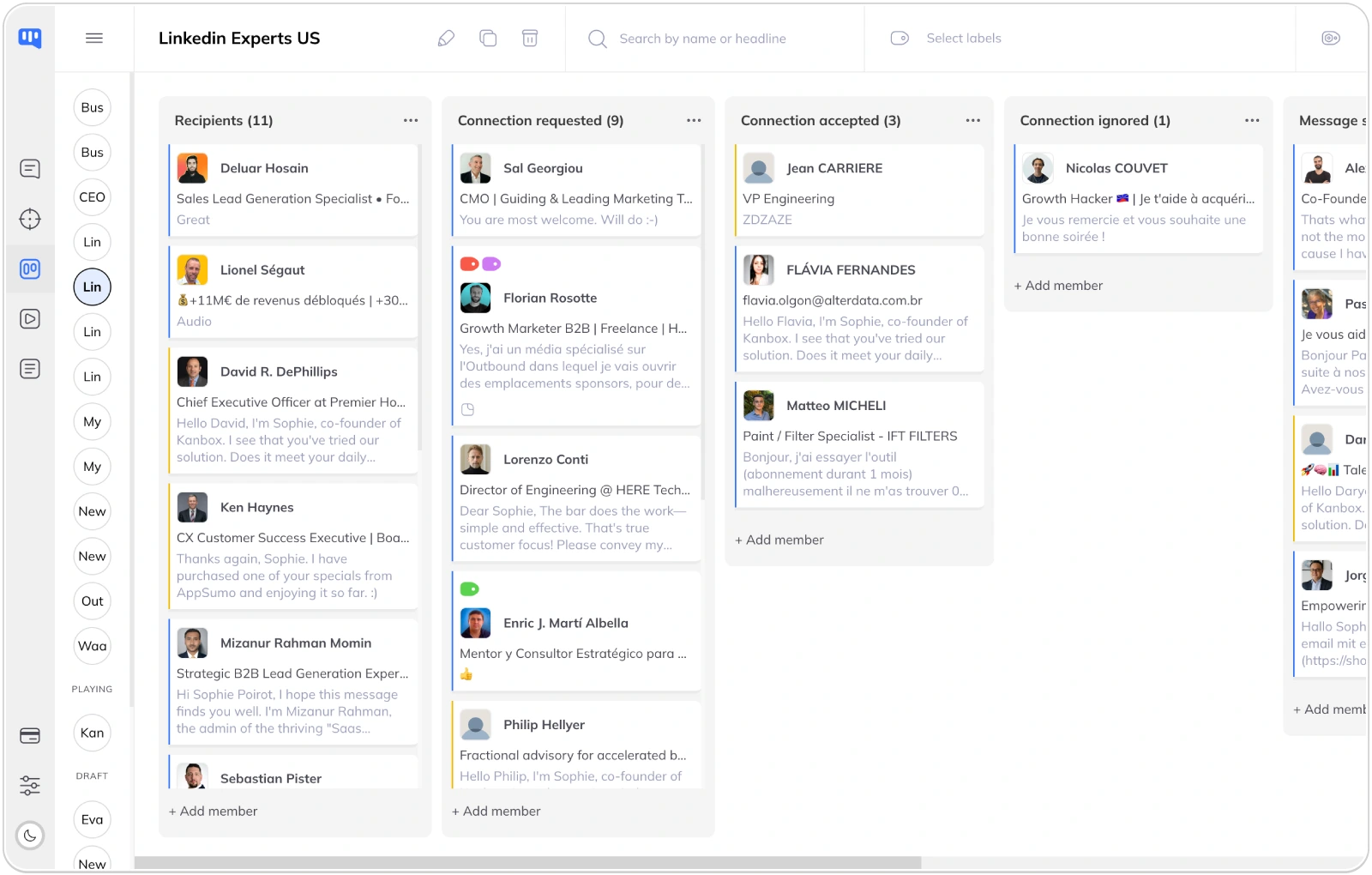
- Visual CRM pipelines easily adaptable to any sector or strategy
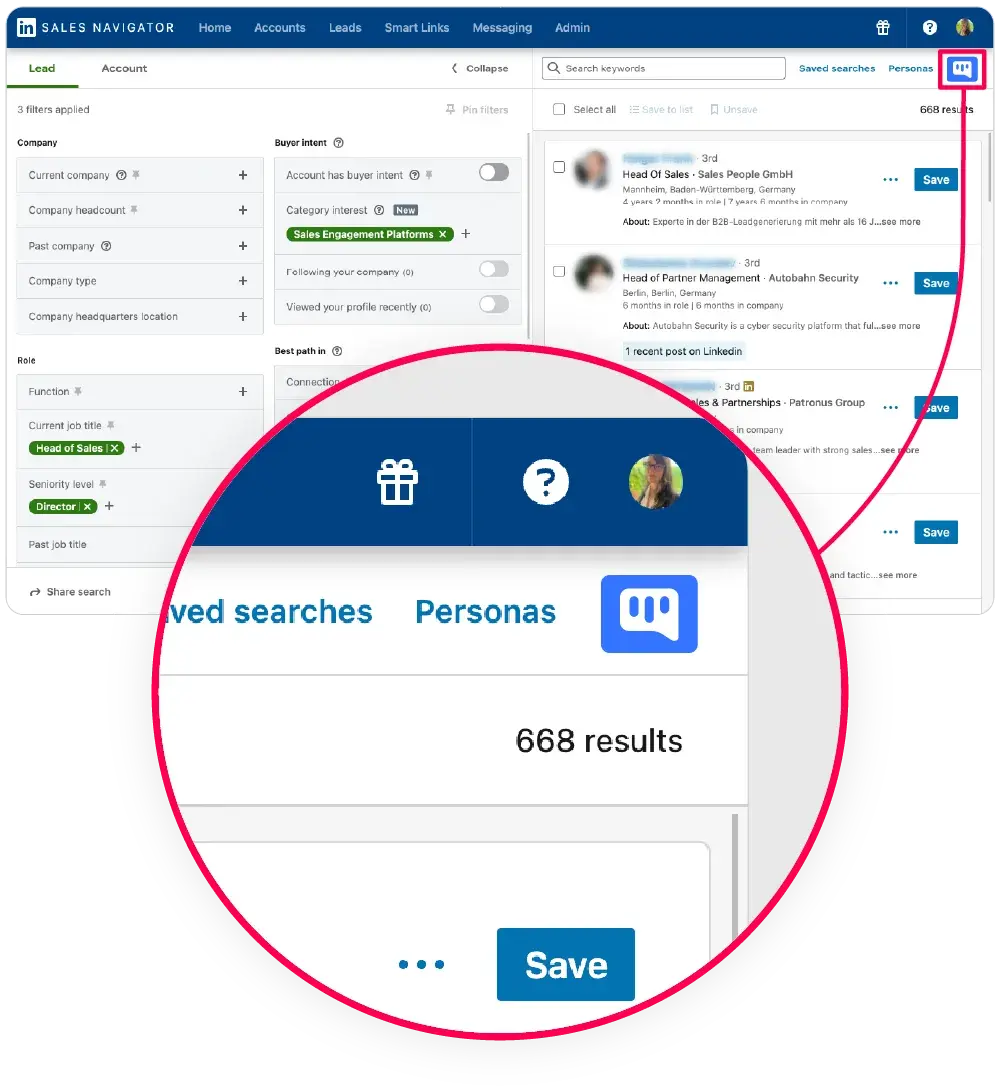
- High-performance scraper capable of extracting up to 75,000 profiles/month from LinkedIn and Sales Navigator
- Labels, notes, and filters to improve lead management and optimize follow-up actions
These features help marketing and sales teams save time, leverage existing data, and send more relevant messages from the start. They suit both small teams and structured businesses.
Areas for improvement
Although overall ratings are very positive, some users share constructive feedback to help improve the experience.
Common feedback:
- Currently no multichannel prospecting (email + LinkedIn), though this is coming soon
- Some would like more visual customization options in pipelines or the Inbox (icons, colors)
- For users unfamiliar with automation tools, the breadth of options may require a short onboarding time
However, a quick-start guide is available in the interface, and customer support is on hand for assistance.
In short:
Kanbox is an ergonomic, comprehensive, and scalable solution. It brings together all LinkedIn prospecting steps in a single tool. Despite a few ongoing adjustments, users praise its overall performance, clear features, and excellent cost/value ratio.
What users say
A few short quotes from verified users that sum up the Kanbox experience.
I discovered Kanbox on AppSumo and was blown away by the automation quality. Every step of the process is thoughtfully built.
The Inbox + Pipelines + Scraper combo is just perfect. A truly all-in-one prospecting solution.
Core Features
Top 5 favorite features according to users

Pricing
How much does Kanbox cost, according to users?
Kanbox users find the tool to offer excellent value for money, especially given the number of features included. Pricing is simple, with no hidden fees, and each plan is designed to match your team size, data volume, and desired level of automation.
Starter
- Simultaneous Campaign: 1
- Lead Import: 300 /month
- Cloud-based
- Email Finder
- Smart Linkedin Inbox with Tags and Filters
Essential
- Simultaneous Campaign: 3
- Lead Import: 600 /month
- Cloud-based
- Email Finder
- Smart Linkedin Inbox with Tags and Filters
- Team / Multi-account
- Unlimited account managers
Pro
- Simultaneous Campaign: 5
- Lead Import: 75K /month
- Cloud-based
- Email Finder
- Smart Linkedin Inbox with Tags and Filters
- Unlimited AI Prompts and Prompt Templates
- Team / Multi-account
- Unlimited account managers
- Webhooks / API
Agency
- Simultaneous Campaign: Unlimited
- Lead Import: 75K /month
- Cloud-based
- Email Finder
- Smart Linkedin Inbox with Tags and Filters
- Unlimited AI Prompts and Prompt Templates
- Team / Multi-account
- Unlimited account managers
- Webhooks / API
- Unlimited account managers
- Bring your own Proxies
All plans include: Automated sequences, CRM pipelines, enhanced LinkedIn messaging, email finder, and advanced lead management.
Free trial: no credit card, no commitment
Kanbox offers a 15-day free trial with no payment required. The trial lets you test the platform in real conditions, with access to:
- All core features
- 30 credits for the email finder
- Integration with your LinkedIn account
This gives sales and marketing teams time to evaluate the direct impact on their outreach strategy.
A cost-effective option compared to alternatives
According to multiple user reviews, Kanbox is up to 50% cheaper than comparable tools, while offering more built-in features, even at the entry-level plan.
- No need to stack 3 or 4 external tools
- Single cost for the full outreach workflow (scraping, messaging, CRM, analytics)
- Easy to scale up as your business or team grows
In short: Whether you’re a solo entrepreneur, freelancer, SMB, or agency, Kanbox offers flexible plans adapted to your pace and lead generation goals. The tool is built to maximize performance—without blowing up your monthly budget.
Frequently Asked Questions about Kanbox
Can't find the answer you're looking for? Reach out to our customer support team.
What are the key features of Kanbox?
Kanbox offers a comprehensive tool for LinkedIn automation, combining advanced features such as a Smart Inbox, automated Kanban pipelines, and seamless integration with your lead generation workflow.
Key capabilities include:
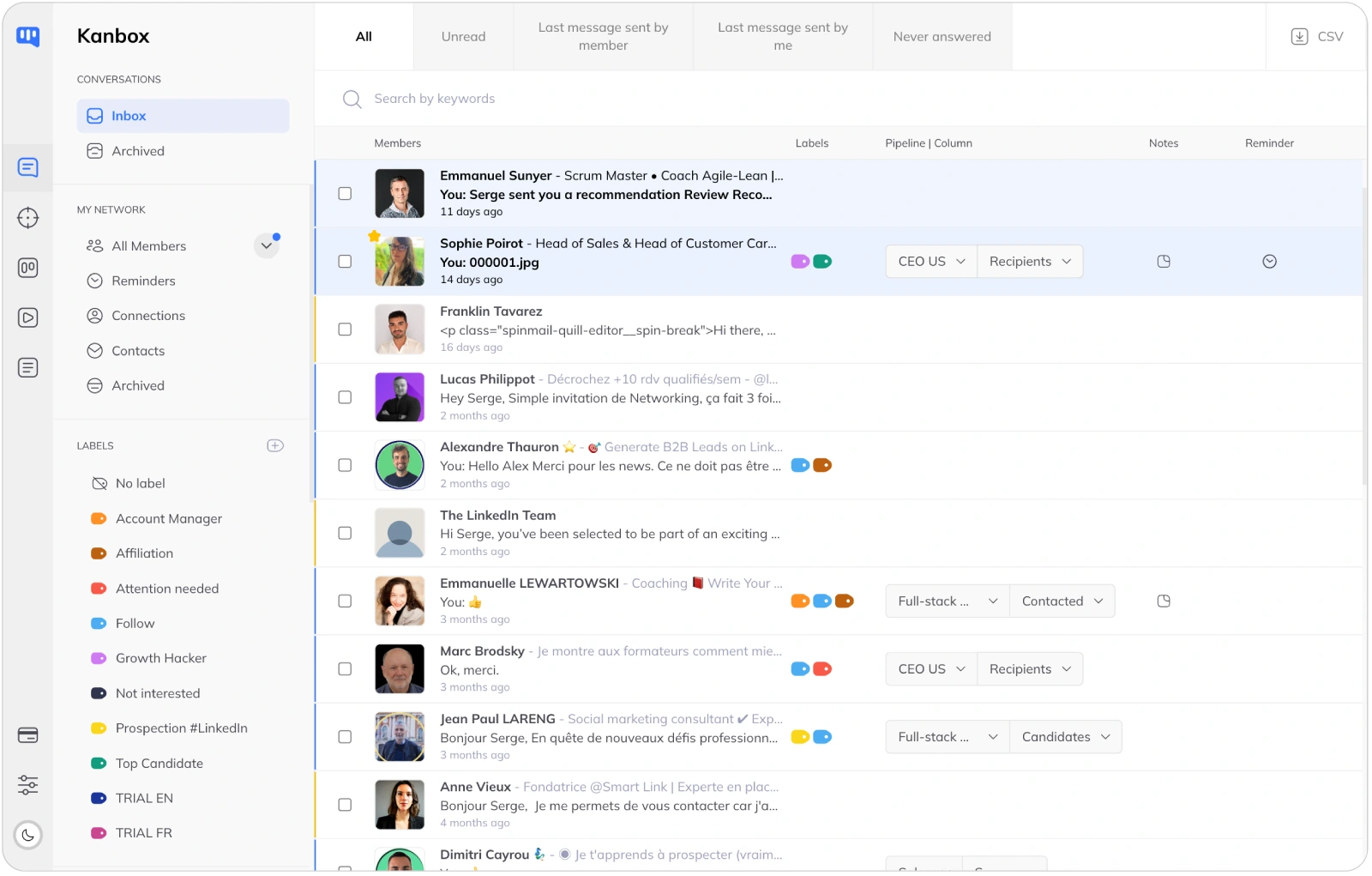
- LinkedIn inbox management in full-screen view with sorting, notes, and labeling
- Visual Kanban boards for sales and recruiting pipelines
- High-volume data extraction: scrape up to 75,000 LinkedIn profiles/month
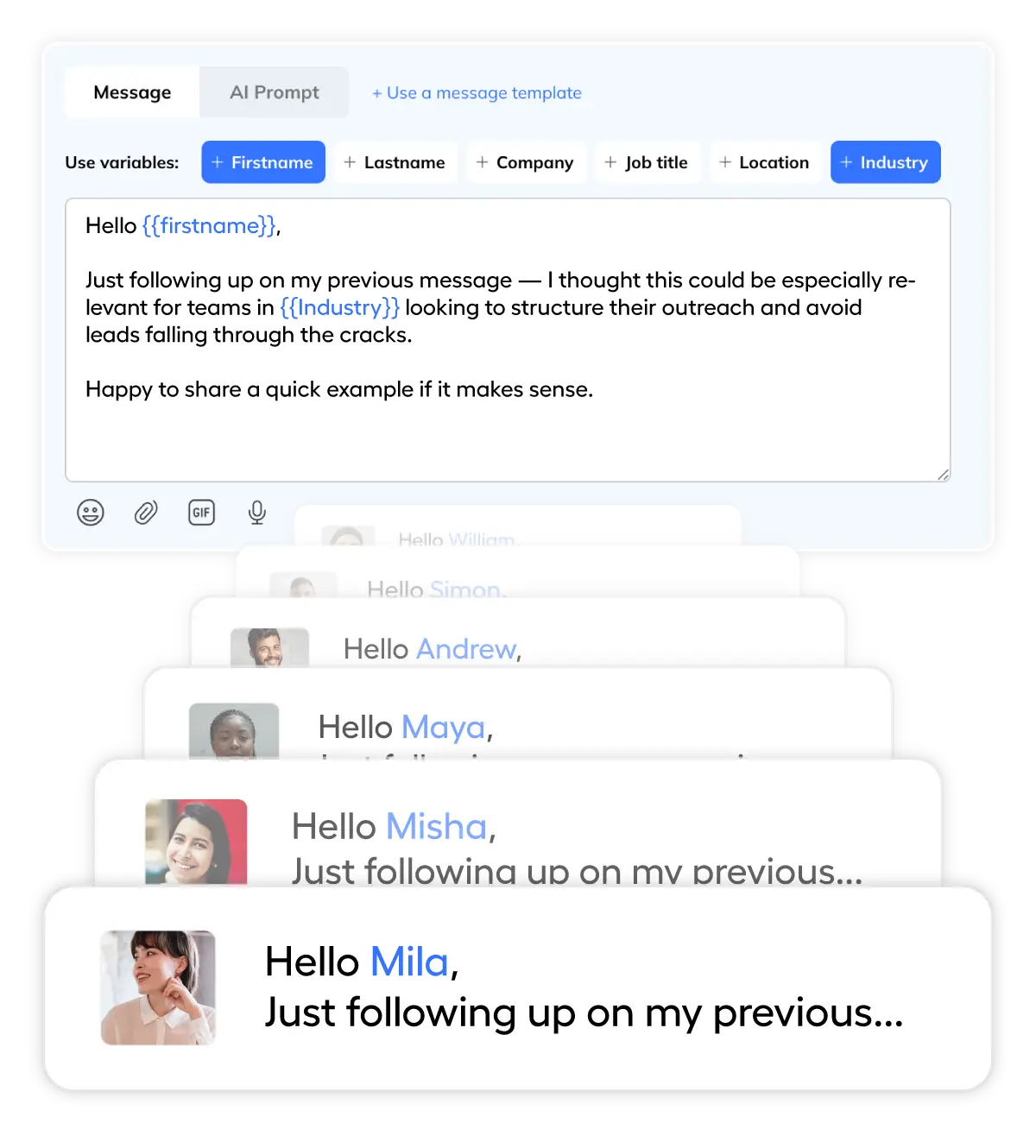
- Dynamic templates and multistep automated campaigns
- Email finder with 98% deliverability and CSV export support
Whether you’re building lead lists, managing multiple accounts, or launching personalized outreach, Kanbox is designed to help you scale your acquisition efforts efficiently.
How does Kanbox compare to alternatives?
If you’re comparing LinkedIn tools, Kanbox stands out as the best alternative to Dripify, Waalaxy, or Outboundly for teams seeking a complete software in one place.
Unlike other tools that require 3–4 platforms to connect, send, organize, and manage, Kanbox provides:
- All-in-one functionality: scraping, connection requests, campaign follow-ups, CRM pipelines
- Strong reviews on Capterra, GetApp, and Software Advice
- Clean UX and smooth onboarding—no coding or complex setup
For buyers looking to compare Kanbox vs Outboundly or other LinkedIn outreach and lead generation software, user feedback highlights its clarity, automation, and superior pipeline management.
Is Kanbox worth the price?
Kanbox delivers excellent value with flexible pricing.
Each monthly plan includes core features like lead scraping, CRM pipelines, Smart Inbox, and the email finder.
- Starts at €25/month
- 15-day free trial available, no credit card required
- Optional lifetime deal (via AppSumo, if still active)
- Annual plans offer up to 40% savings
Compared to alternatives, Kanbox offers more features even at the basic tier—making it an affordable, scalable option for any team focused on LinkedIn acquisition.
What are the pros and cons of Kanbox?
Pros (as mentioned in verified ratings and customer reviews):
- Very user-friendly interface, designed for high engagement
- Full automation of LinkedIn tasks: profile visits, messages, follow-ups
- Highly visual and customizable pipeline manager
- Excellent support and onboarding materials
Cons:
- No multichannel (email + LinkedIn) yet, though planned in roadmap
- Limited visual customization in pipelines (e.g., icons, colors)
- Some onboarding effort needed if you’re new to automation
Users are encouraged to submit an honest review on trusted platforms like Software Advice or Capterra to share their feedback.
How to use Kanbox for lead generation?
Kanbox is a powerful LinkedIn automation tool designed to boost your lead generation efforts.
You can:
- Use the LinkedIn scraper to extract targeted profiles
- Launch personalized automated campaigns across connection + message steps
- Track every connection request, message, or follow-up via automated Kanban pipelines
- Use the email finder and advanced filters to enrich and prioritize lead lists
- Export your CSV database to connect with tools like HubSpot or your own CRM
Whether you’re prospecting manually or managing high-scale LinkedIn tasks, Kanbox helps streamline the entire outreach and lead generation process.
What is the user experience with Kanbox?
The customer experience is consistently rated as efficient, smooth, and intuitive.
Users describe the software as:
- Extremely helpful for streamlining communication
- Easy to navigate, even for first-timers
- Ideal for managing multiple accounts, switching safely with proxies
- Clearly organized with columns, labels, and segmentations for every lead
For teams juggling multiple lists, inboxes, and tasks, the workflow clarity and structure of Kanbox is a major advantage.
What are the risks of using Kanbox?
While Kanbox is designed to stay within LinkedIn usage limits, any form of automation carries potential risks, such as:
- Connection limits being reached faster on basic LinkedIn plans
- The need to manage multiple daily actions (scrape, invite, follow-up) thoughtfully
- A short learning curve for new users who aren’t familiar with automation platforms
- The risk of manual errors if team members aren’t aligned on outreach sequences
However, features like rate limit automation, smart inbox rules, and detailed onboarding help mitigate these issues and ensure safe, compliant usage.
Ready to try Kanbox for yourself?
Join 2,000+ sales teams, recruiters, and agencies who trust Kanbox to streamline their LinkedIn prospecting. undefined
15 days free · No credit card required · Full access from day one